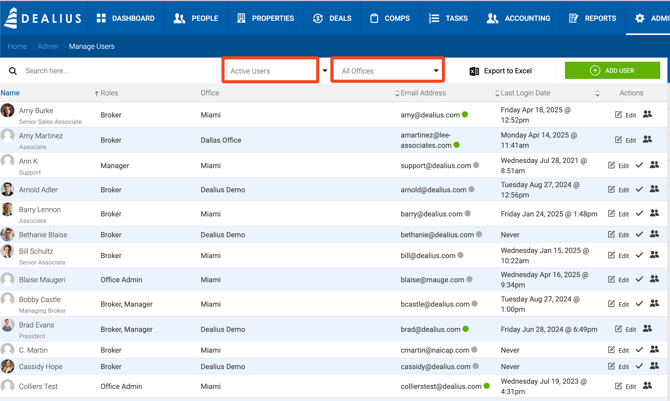
Users of the system can be accessed under Admin > Users and Roles. The grid view allows searching by username, email and office, filtering by status (Active vs Inactive) and offices:
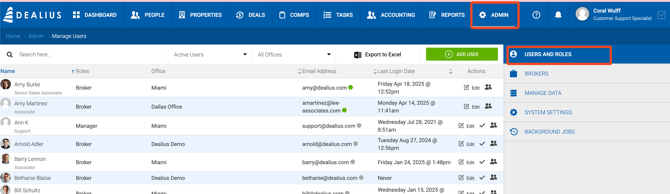
The list of users in this grid depends on the permissions defined for the user who is logged in:
Super Admin (Dealius ONLY)
-
Can manage all company settings.
-
Not assigned to any office.
-
Can create/Edit/Deactivate/Delete users of any role.
-
Can create deals.
-
Can approve deals.
-
Has full access to the Accounting section.
-
Has full access to Dashboard widgets.
-
Can export this grid in Excel format.
Office Admin
-
Can manage all settings excluding Environment Configuration.
-
Must be assigned at least to one office.
-
Manager’s access is limited to his/her office(s) only.
-
Can Edit/Deactivate/Activate/Delete users with all roles, except for the Admin, in his/her offices only.
-
Can create deals.
-
Can approve deals.
-
Has office-restricted access to the Accounting section.
-
Has office-restricted access to Dashboard widgets.
Manager
-
Can View users with all roles except for the Admin in his/her offices only.
-
Can manage brokers from his office.
-
Can manage Offices and Submarkets only in Manage data.
-
Doesn’t have access to system Settings.
-
Must be assigned at least to one office.
-
Manager’s access is limited to his/her office(s) only.
-
Can create deals.
-
Can initiate deal closing and participate in the Approval process.
-
Has office-restricted access to the Accounting section.
-
Has office-restricted access to Dashboard widgets.
Broker
-
Doesn’t have access to Admin, Reports and Accounting sections
-
Must be assigned only to one office.
-
Dashboard shows data based on the Broker’s results. No access to Leaderboard.
-
Can create deals.
-
Can initiate deal closing and participate in the Approval process.
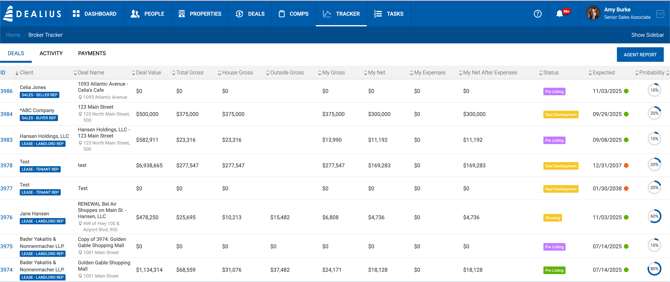
- Has access to the Tracker page.
- May have access to some reports. An individual Broker can not be granted permission to create and download specific reports. A new setting, available for Office Admins, is added to the Add/Edit user pop-up under Admin > Users & Roles for the users who have Broker role. If the Reports toggle is enabled, Add a user setting (in the Edit/Add User pop-up) to allow Broker to access reports. For this, add a new toggle called “Reports” disabled by default and present for Admin Assistants and Brokers. Available reports in the dropdown are listed below. In most of them, the system will filter out deals the current broker doesn’t have access:
- Aging Report
- Aging Report with Date Range
- Comp Report
- Contract Deadline Pending
- Deal Activity
- Lease Options
- Lease Renewals
- Power Broker
- Transactions Press Release
- Another report that is available is Pipeline Report. It is filtered to contain only the deals available for the broker.
Admin Assistant:
- Doesn’t have access to Dashboard, Reports, Admin and Accounting sections
- The Assistants do not see financials relating to the House or Agents, but can see gross commissions and broker gross.
- Must be assigned at least to one office and at least to one Broker.
- Access is limited to his/her brokers only. But Admin Assistant is able to add any broker from his offices or all offices (depending on the Show Brokers Across All Offices toggle from Deal default settings) to the deal and listing.
- People: Add/Edit
- Tasks: Add/Edit
- Deals: Add/Edit deals. The Assistant is also able to close a deal on behalf of their assigned brokers but will not see broker/house splits.
- Can approve deals. The system will say 'Approved by User Name on behalf of <broker name>' if this role approves deal closing instead of other members.
- May have access to some reports. An individual Admin Assistant can not be granted permission to create and download specific reports. A new setting, available for Office Admins, is added to the Add/Edit user pop-up under Admin > Users & Roles for the users who have Admin Assistant roles. If the Reports toggle is enabled, Add a user setting (in the Edit/Add User pop-up) to allow Admin Assistant to access reports. For this, add a new toggle called “Reports” disabled by default and present for Admin Assistants and Brokers only. Available reports in the dropdown are listed below. In most of them, the system will filter out deals the current admin assistant doesn’t have access:
- Aging Report
- Aging Report with Date Range
- Comp Report
- Contract Deadline Pending
- Deal Activity
- Lease Options
- Lease Renewals
- Power Broker
- Transactions Press Release
- Another report that is available is Pipeline Report. It is not only filtered to contain only the deals available for the admin assistant, but also hides Broker Expenses, House Expenses, Broker Net After Expenses, and House Net After Expenses columns.
Users grid shows name, role(s), office(s), email, and the last login date. All columns can be used to sort the users: