
A deal can be unlinked from a listing directly from the Deal Profile. When a deal is linked to a listing, it shares the listing's property snapshot — meaning property data in the deal flows from the listing. Understanding this relationship is important before unlinking, as it affects how the deal's property data behaves afterward.
How to Unlink a Deal from a Listing
Unlinking is done from the Deal Profile, not from the Listing Profile.
- Open the Deal Profile.
- If the deal is closed or pending close, it must be reopened first — a user with Admin access is required to reopen a closed deal.
- In the Property Information section, locate the linked listing.
- Click the ✕ icon next to the linked listing to disconnect it.
- Once disconnected, the property is removed from the deal. Manually select or re-link a property directly on the Deal Profile — this time without going through a listing.
- Save the deal. If the deal was reopened, proceed through the closing process again when ready.
Note: A listing's property cannot be changed while deals are linked to it. If you need to change the property on the listing itself, all linked deals must be unlinked first.
Terminating a Listing Without Unlinking Deals
If the goal is simply to close out the listing — for example, because the listing agreement has ended or the property is no longer available — you can terminate the listing without unlinking any deals first. A listing can be terminated at any status: On Market, In Contract, or Closed.
- Open the Listing Profile.
- In the status dropdown on the right sidebar, select Terminated.
- Confirm if prompted.
Linked deals are not affected and remain in their current state. The property snapshot is retained on all linked deals. The listing remains accessible but is no longer active on market. 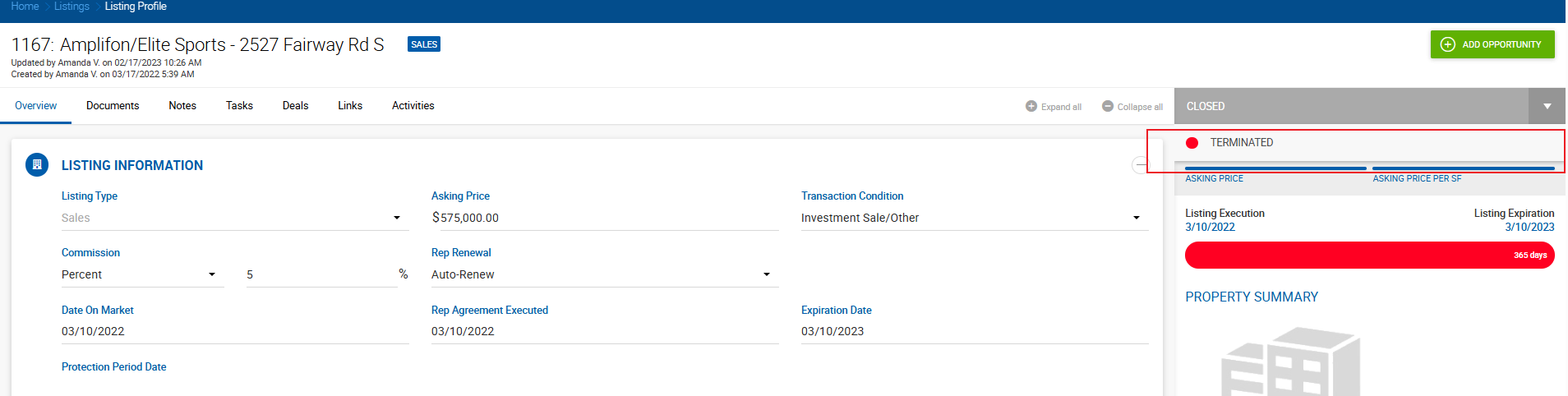
Use termination when you want to end the listing without touching deal associations. Use unlinking when you need to change the property on the listing or sever the connection between a specific deal and the listing.
What Happens After Unlinking
| Before unlinking | After unlinking | |
|---|---|---|
| Property data source | Shared listing snapshot — updates to the listing's property refresh automatically | No property on the deal — must be selected manually |
| Listing | Unchanged — the listing remains active with its own status | Unchanged |
| Deal | Property data flows from the listing | Property can be linked and updated independently on the deal profile |
| Associated comp | If a comp exists from this deal, it pulls property data from the deal snapshot | Unaffected |
Effect on Listing Status
Unlinking a deal does not automatically change the listing's status. The listing continues to function independently. Its status changes are driven by its own rules:
- A listing moves to Closed status when an associated deal is closed.
- A listing moves to Off Market or Expired based on its own dates and settings.
If you unlink the deal and then close it separately, the listing will not automatically update to Closed — the connection that would have triggered that status change no longer exists.
When the Listing Property Needs to Change
If the goal is not just to unlink the deal but to update or replace the property on the listing itself, the process is:
- Reopen any linked deals.
- Unlink the listing from those deals.
- Update the property on the listing.
- Re-link the listing back to the deals.
- Close the deals again.
This ensures the comp linked to each deal also picks up the updated property data, since the comp's property snapshot flows from the listing via the deal.
Key Rules
- A property cannot be unlinked from a listing while deals are still linked to it.
- Unlinking a deal from a listing requires the deal to be in an active (non-closed) state. Closed deals must be reopened by an Admin first.
- After unlinking, the property is removed from the deal and must be selected manually.
- A listing can be terminated at any status without unlinking deals — linked deals are not affected.
- A deal linked to a listing shares its property snapshot with all other deals on the same listing. Refreshing the listing's property snapshot updates all linked deals simultaneously — which is also why the system prevents the refresh if the current user doesn't have access to all those deals.