Overview
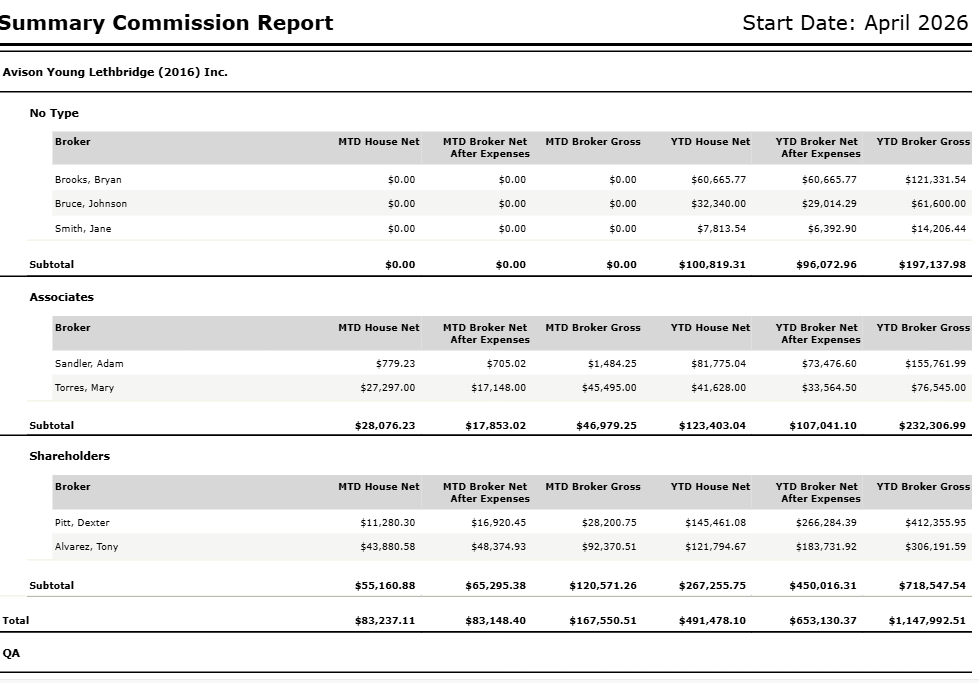
The Summary Commission Report provides a breakdown of gross commissions by broker for the selected month (MTD) and the fiscal year to date (YTD). It can be generated for the overall office using the Office format, or by individual broker using the Broker format.
When the Broker format is selected, deals are grouped by broker and sorted alphabetically by last name, without grouping by office or broker type.
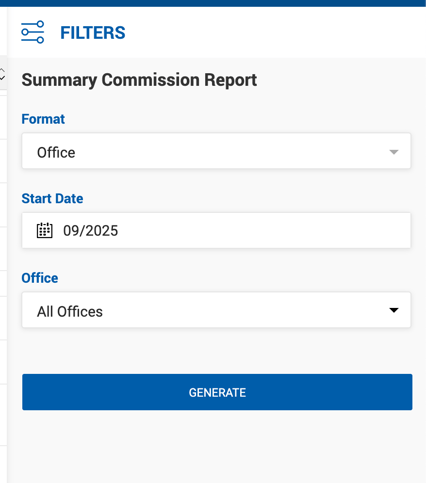
Filters
| Filter | Description |
|---|---|
| Format | Office or Broker. |
| Start Date | Single month/year selection. The Payable Paid Date is used for generation. |
| Offices | Filter by one or more offices. |
Report Columns
| Column | Description |
|---|---|
| Broker | Broker name in Last Name, First Name format. |
| MTD House Net | Sum of House Net payments received from the first to the last day of the selected month. Expenses are not deducted. |
| MTD Broker Net After Expenses | Monthly Broker Net after all deal and non-deal expenses are deducted. Formula: Broker Net − Broker Expenses. |
| MTD Broker Gross | Sum of Broker Gross from the first to the last day of the selected month. |
| YTD House Net | Sum of House Net from the start of the fiscal year to the last day of the selected month. Expenses are not deducted. |
| YTD Broker Net After Expenses | YTD Broker Net after all deal and non-deal expenses are deducted. Formula: Broker Net − Broker Expenses. |
| YTD Broker Gross | Sum of Broker Gross from the start of the fiscal year to the last day of the selected month. |
Report Structure
The report is grouped and sorted as follows:
- Office name
- Broker Type (No Type, Associates, Shareholders)
- Column headers
- Individual broker rows
- Subtotal
- Total for the office
- Broker Type (No Type, Associates, Shareholders)
- Grand Total (all offices combined)
Broker Type handling:
- If at least one broker in the report has a Broker Type assigned, brokers without a type are grouped under No Type.
- If no brokers in the report have a Broker Type, the type label is left blank.