Overview
Spaces can be deactivated to prevent them from appearing when new listings, deals, or comps are created from the parent property. Each space on a Property Profile has a Deactivate button. Once deactivated, the button changes to Activate and the space can be reactivated at any time.
Viewing Deactivated Spaces
By default, deactivated spaces are hidden from the space list on the Property Profile. To show all spaces including deactivated ones, enable the Show Deactivated Spaces filter at the top of the list.
Impact on Property Counts & Sidebar
Deactivated spaces are excluded from the following values on the property grid and profile sidebar:
-
# of Spaces (grid view)
- Square Feet Available
- Number of Spaces Available
- Total Number of Spaces
Restrictions on Deactivated Spaces
A deactivated space cannot be:
- Added to a new listing, deal, or comp
- Used as a folder in the property's Gallery tab
Impact on Existing Listings
The effect of deactivating a space depends on whether that space is already linked to listings, deals, or comps:
| Scenario | Result |
|---|---|
| Space is linked to a Terminated or Off Market listing and is not tied to any deal or comp through that listing. | Space is removed from the listing. Listing status does not change. |
| Space is already tied to a deal or comp through a listing. | Space is not removed from the listing. Listing status does not change. |
| Space is linked to an Expired listing with no deals or comps tied to it through that listing. | Space is removed and the listing status is recalculated. |
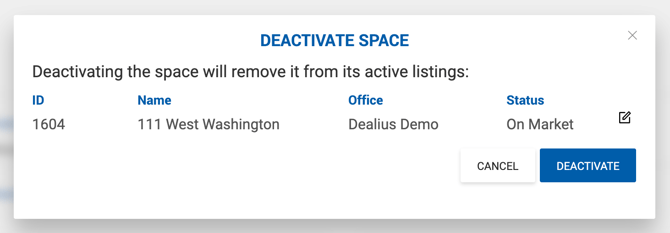
| Space is linked to an On Market or In Contract listing with no deals or comps tied to it through that listing. | A warning appears: "Deactivating the space will remove it from its active listings: [Listing ID] [Listing Name] [Status]" — with Cancel and Confirm options. |