Overview
The Franchise Fee (FFE) is a configurable fee calculated at deal closing based on internal broker grosses. It defaults to 2% and can be customized as needed. Changes to the franchise fee settings apply to open deals only — closed deals are not affected.
To disable the Franchise Fee: Set the Franchise Fee % to 0.
Configuration
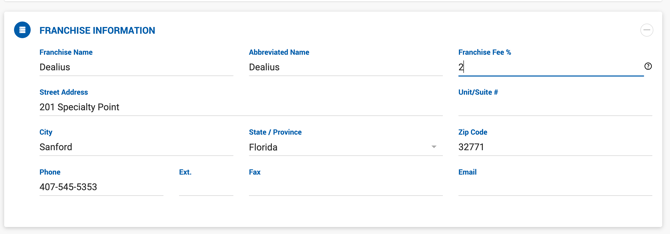
Franchise Fee settings are managed under Admin > System Settings > Franchise Fee. The following information can be stored:
| Field | Required |
|---|---|
| Franchise Name (e.g., Coldwell Banker Commercial Alliance) | Required |
| Abbreviated Name | Optional |
| Franchise Fee % | Required |
| Street Address | Optional |
| Unit / Suite # | Optional |
| City | Optional |
| State | Optional |
| Zip | Optional |
| Phone | Optional |
| Fax | Optional |
| Optional |
Franchise information entered here is included on the Invoice PDF.
How the Franchise Fee is Calculated
The FFE is calculated at the time of deal closing and recalculated during the Clear Open Balance action based on Amount Received.
Formula: Franchise Fee = Franchise Fee % × Sum of Internal Broker Grosses
Outside broker grosses are excluded from the calculation.
Important: The FFE does not affect Total Gross, Broker Gross, or Broker Net. It is generated as a House expense and impacts only House Net After Expenses.
Example:
| Amount | |
|---|---|
| Total Commission | $10,000 |
| Franchise Fee (5%) | $500 |
| Broker Gross | $10,000 |
| Broker Net (50%) | $5,000 |
| House Net (50%) | $5,000 |
| House Net After Expenses | $4,500 |
Disabling FFE on a Specific Deal
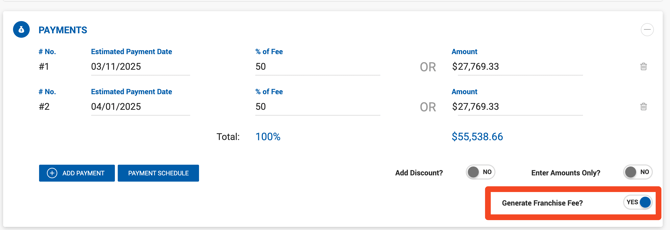
The FFE can be disabled on a per-deal basis under Deal Profile > Payments using the Generate Franchise Fee toggle. When disabled, no FFE payable is generated for that deal.
If you do not see an FFE payable under the Payables list for a deal, check whether this toggle is enabled on the deal profile. To re-enable it on a closed deal, the deal must be reopened first.