
The Property Profile Info tab contains two owner-related sections: Owner Information and Owner Contact Details. Together, these sections allow you to associate an owner company, owner contacts, and additional contacts with a property.
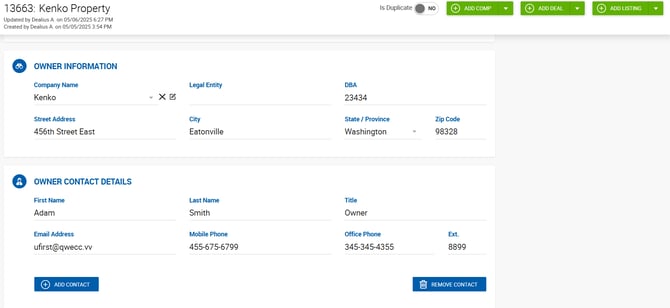
Owner Information
This section functions similarly to the Client Information section on a deal profile. You can search for an existing company of any type or create a new one directly from here.
Fields:
- Legal Entity — Stored at the property level for the selected company, similar to how it is stored on deals. Every new value entered here is recorded on the company's card.
- When a company is selected or created in this section, it is automatically assigned the Owner type. This is reflected on the company card under the People tab as an owner tag, and in the company's Linked Properties area, which contains two lists:
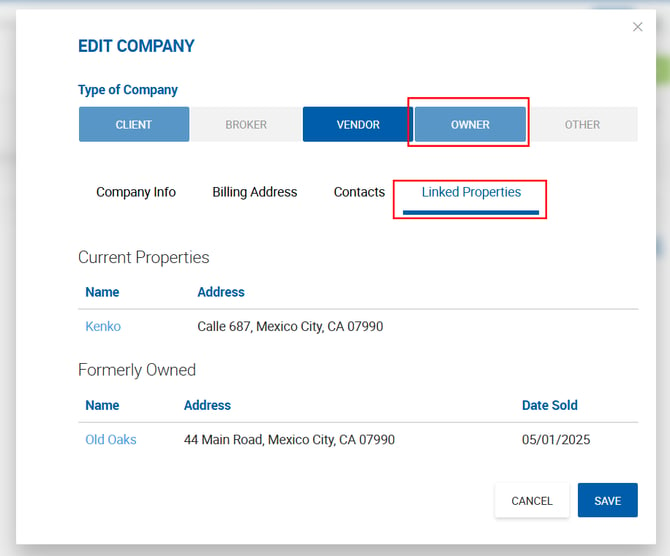
- Current Properties — Properties where this company is listed as an owner. Each entry links to the property profile in a new tab.
- Formerly Owned — Properties pulled from sale deals where this company is listed as the Seller Company. Each entry links to the property profile.
Note: The Linked Properties area is informational only. Properties cannot be linked or unlinked directly from a contact or company card.
Owner Contact Details
Contacts in this section are automatically populated based on the company selected in the Owner Information section, provided the current user has permission to view them.
All contacts added or created here are automatically assigned the Owner contact type. The same changes are reflected on the contact's record under the People tab.
Other Contacts
Additional contacts of any type can be added to the property in the Other Contacts section. Multiple contacts with different contact types can be added here.
Contacts are only visible to users who have permission to view them. If a user does not have the required permission, the contact is displayed as blocked with a lock icon.