Overview
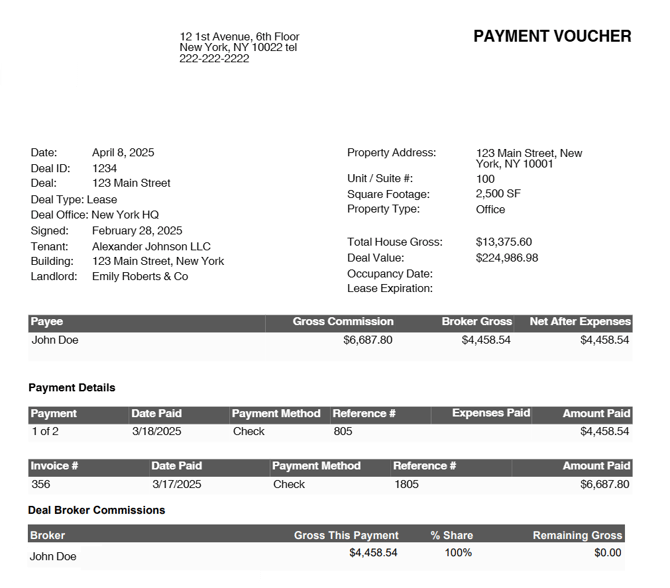
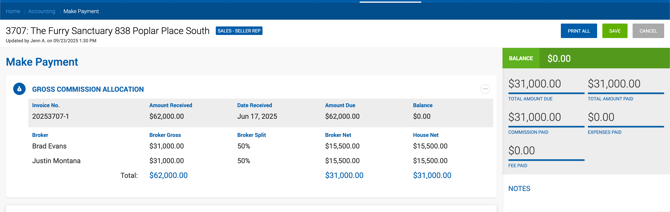
Payment Vouchers can be printed from both the Payables grid and the Make Payment screen. They are available for internal and outside brokers only and provide a summary of the selected payment.
Voucher Sections
Expected Payment Details The first grid displays the expected payment information for the selected payable.
Payment Details Shows information about payments already applied. Columns include:
| Column | Description |
|---|---|
| Payment | Payment number. |
| Date Paid | Date the payment was made. |
| Payment Method | ACH, Check, or Wire Transfer. |
| Reference # | Payment reference number. |
| Expense Paid | Expenses deducted from this payment. |
| Amount Paid | Net amount paid. |
Invoice Details Reflects Invoice #, Date Paid, Payment Method, Reference #, and Amount Paid. Columns are populated only once the invoice has been paid.
Commission Plan Details Displayed for internal brokers only. Shows the split plan in use for the current fiscal year, with the broker's current tier highlighted. This section can be hidden by disabling the corresponding setting under Admin > Payment Voucher Settings.
If the associated receivable is unpaid, partially paid, or overpaid, an appropriate notification is printed on the voucher.
Outside Broker Voucher
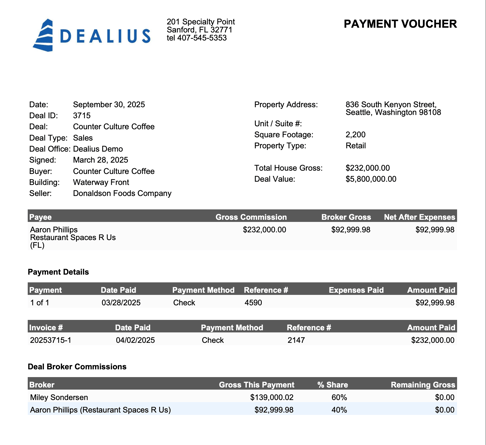
The outside broker voucher contains a condensed set of information:
| Field | Description |
|---|---|
| Payee | Company Name (Broker Name). |
| Gross Commission | Receivable value. |
| Broker Gross | Broker gross commission. |
| Net After Expenses | Broker Gross minus Expenses. |
The outside broker's company billing address (street, city, state, ZIP) is displayed on the voucher. If no company billing address is on file, the broker's primary address is used instead.
Deal Broker Commissions Section
This optional section can be enabled under Admin > System Settings > Payment Voucher Settings > Display Deal Broker Commissions. When enabled, it appears on the voucher with the following columns:
| Column | Description |
|---|---|
| Brokers | Broker name for house brokers; broker name with company name in parentheses for outside brokers. |
| Gross This Payment | Broker gross per broker related to this receivable. |
| % Share | Broker's percentage share of the deal commission. |
| Remaining Gross | Unpaid broker gross per broker, calculated from unpaid receivables. |