
Brokers and team members can now share opportunity pipelines with each other directly within CRM Pro. This makes it easy for broker teams to collaborate on a shared pipeline, for admin assistants to manage pipelines on behalf of their brokers, or for management to review pipeline activity across the team.
Sharing a pipeline
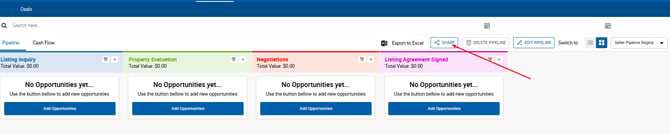
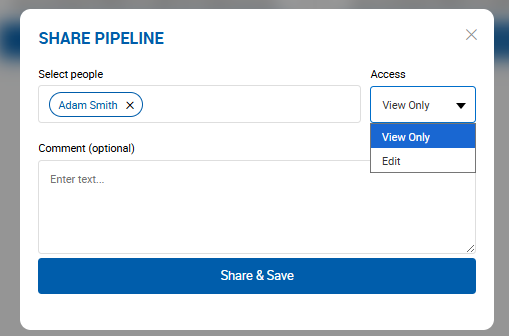
Click the Share button on any pipeline you own to open the Share pop-up. Search for a CRM Pro user by name, choose their access level — View Only or Edit — add an optional message, and click Save. The recipient receives both an in-app and email notification letting them know the pipeline has been shared with them, and the shared pipeline appears in their My Pipeline dropdown marked with an icon indicating their access level.
Access levels
There are three access levels for shared pipelines:
Owner — the broker who created the pipeline has full control: sharing, editing the pipeline name and stages, adding, editing, and deleting opportunities, and dragging opportunities between stages.
Editor — can view and make changes to the pipeline including editing the name, stage names and colors, reordering stages, and adding, editing, or deleting opportunities. Editors cannot modify sharing settings.
Viewer - read-only access to the pipeline and its opportunities. The pipeline appears in the My Pipeline dropdown with a View icon.
Managing access
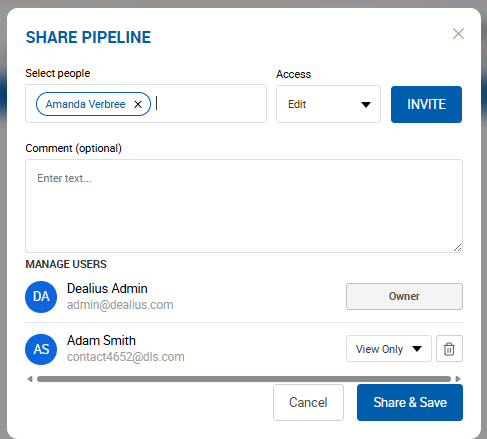
Click Share again on a pipeline you own to manage existing access. From the Manage Access panel you can upgrade a Viewer to Editor, downgrade an Editor to Viewer, or revoke access entirely. The access counter on the Share button updates to reflect the current number of users with access.
Opportunity visibility
When an opportunity is in a shared pipeline, its Shared Access section lists everyone who has access and their role. This is read-only at the opportunity level - sharing is managed at the pipeline level only. If a shared user does not have permission to view the contact linked to an opportunity, the Client Name field will be visible in read-only mode.
When access is revoked or a pipeline is deleted.
If a pipeline owner revokes access for a user, that user immediately loses visibility into the pipeline and the owner's opportunities. Any opportunities that user added to the pipeline are removed from it - but those opportunities remain accessible to their creator. If a pipeline is deleted, all opportunities within it are preserved but their Pipeline and Status fields are cleared.