Overview
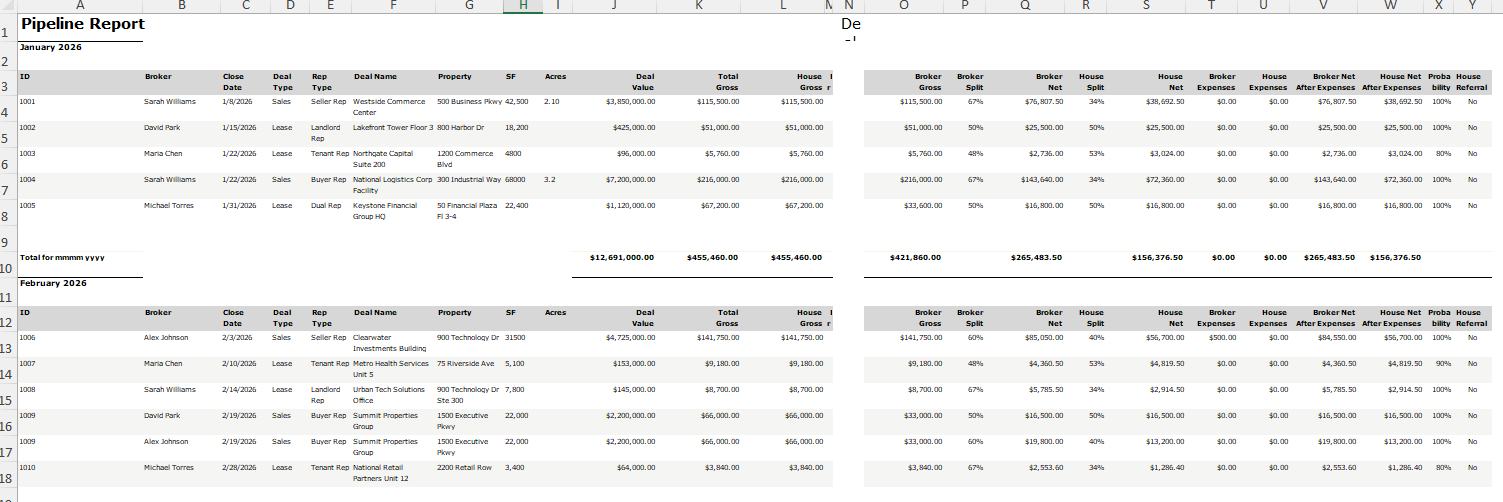
The Pipeline Report provides a monthly breakdown of deal activity with key broker, property, and financial data. It can be generated for specific deal statuses and is grouped by month.
Admin Assistants can access this report if the Reports toggle is enabled under Admin > Users & Roles > Edit User. Once enabled, individual reports can be selected from a dropdown. Deals the current user does not have access to are excluded. For Admin Assistants, the following columns are also hidden: Broker Expenses, House Expenses, Broker Net After Expenses, and House Net After Expenses.
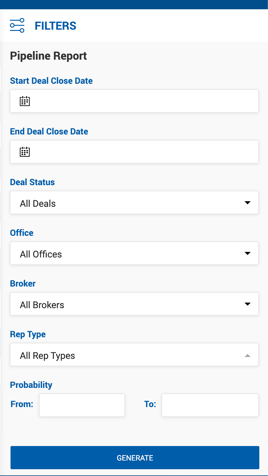
Filters
| Filter | Description |
|---|---|
| Start / End Deal Close Date | Filters by actual or estimated close date. |
| Deal Status | All Deals, Active Deals, Pending Deals, or Closed Deals. |
| Offices | All Offices or a specific office. |
| Brokers | All internal brokers or a specific broker. |
| Rep Types | Multi-select dropdown of deal rep types. |
| Probability | Percentage range. Defaults to 0%–100%. |
| Column | Description |
|---|---|
| ID | Unique deal identifier. |
| Broker | Broker participating in the deal. One row per broker per deal. |
| Close Date | Actual Close Date or Estimated Close Date. |
| Deal Type | Lease, Sales, or Other. |
| Rep Type | Representation type for the deal. |
| Deal Name | Full deal name. |
| Property | Property address. |
| SF | Square footage of the property or space. |
| Acres | Acreage of the property or space. |
| Deal Value | Total transaction value. |
| Total Gross | Total gross commission (internal + outside brokers). |
| House Gross | House gross commission. |
| Broker % | Broker's commission percentage on the deal. |
| Broker Gross | Dollar amount earned by the broker. |
| Broker Split | Broker's split percentage. |
| Broker Net | Broker's net earnings before expenses. |
| House Split | House split percentage. |
| House Net | House net earnings before expenses. |
| Broker Expenses | Deal expenses assigned to the broker. |
| House Expenses | Deal expenses assigned to the house. |
| Broker Net After Expenses | Broker Net minus Broker Expenses. |
| House Net After Expenses | House Net minus House Expenses. |
| Probability | Deal probability percentage. Shown for active deals only. |
| House Referral | Yes or No. |
The report is grouped by month, with a monthly subtotal row and a Grand Total row at the end.