
Overview
The Pending Payable Report with All Expenses is an extension of the standard Pending Payable Report. In addition to pending payables and deal expenses, it includes outstanding non-deal (broker ledger) expenses for each broker. This report is only available when the Broker Ledger feature is enabled under Admin > System Settings.
The report is based on Invoice Paid Date.
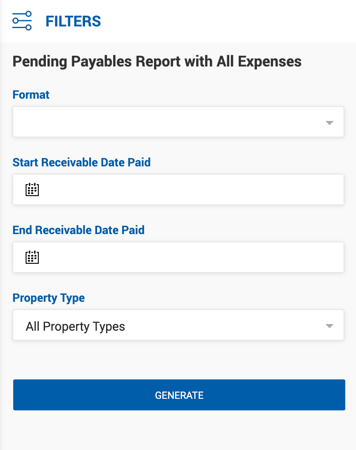
Filters
| Filter | Description |
|---|---|
| Start / End Invoice Paid Date | Filters by the date range when invoices were paid. |
| Format | Company or Broker. |
| Brokers | Filter by specific broker(s). |
| Property Type | Filter by property type. |
Report Structure
The report follows the same structure as the standard Pending Payable Report for payables and deal expenses, grouped by office and then by broker. Each broker section includes:
Standard Payables & Deal Expenses Same columns as the Pending Payable Report: Receivable Date Paid, Broker, Deal ID, Deal Name, Property Type, Deal Type, Payment #, Amount Due, Unpaid Broker Expenses, and Open Balance.
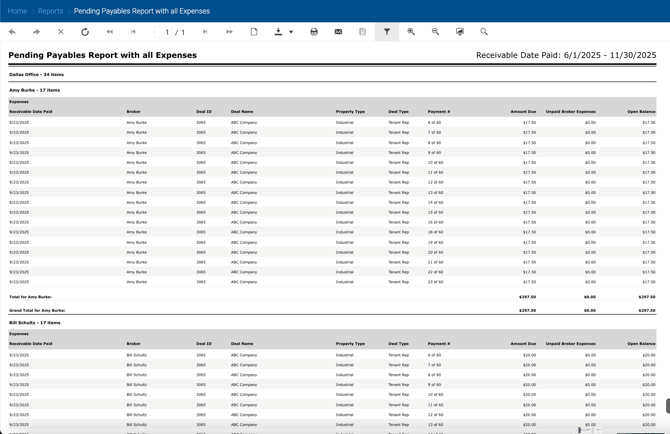
Non-Deal Expenses Subsection If a broker has outstanding non-deal expenses, an additional subsection titled Non-Deal Expenses appears below their payable rows with the following columns:
| Column | Description |
|---|---|
| Expense Name | Name of each outstanding non-deal expense. |
| Unpaid Broker Expense | Outstanding balance for each expense. |
A total row shows the sum of all non-deal expenses for the broker.
Grand Total for Unpaid Expenses The final row for each broker combines both deal expenses and non-deal expenses into a single Grand Total for Unpaid Expenses value.