
Overview
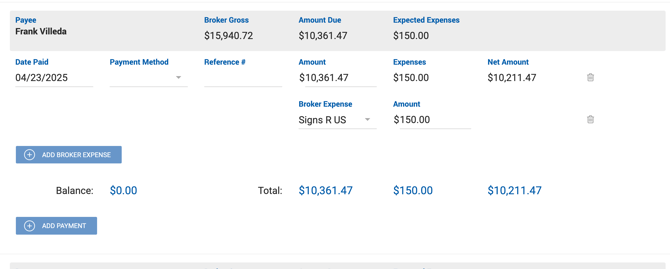
When expenses have been entered on the Deal Profile, the Make Payment screen includes additional columns and sections for managing those expenses alongside the broker payment.
Payment Details — Additional Columns
| Column | Description |
|---|---|
| Expenses | Sum of all expenses from the Expenses and Deductions section. Read-only. |
| Net Amount | Final net amount (Amount minus Expenses). Must be ≥ $0. Read-only. |
Expenses and Deductions Section
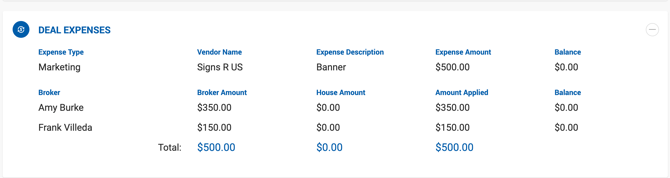
This section mirrors the Expenses section on the Deal Profile. It displays all expected expenses and allows users to enter the amount being applied with this payment.
| Field | Description |
|---|---|
| Expense Type | Type of expense. |
| Vendor Name | Vendor associated with the expense. |
| Expense Description | Description of the expense. |
| Expense Amount | Total expense amount. |
| Balance | Open balance remaining unpaid. |
| Broker | Name of the payer. |
| Broker Amount | Amount Due of expenses per broker. |
| House Amount | Amount Due of house expense per broker. |
| Amount Applied | Read-only. Value is pulled from the applied amount in the Payment Details area. The sum of all Amounts Applied appears as the total in the Expenses column of the Payment Details section. |
| Balance | Amount still unpaid after applied amounts. |
The Total row shows: Total Broker Amount, Total House Amount, and Total Amount Applied.
Applying Expenses
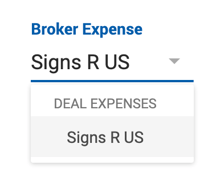
All broker expenses are applied to the payment automatically by default, but individual expenses can be removed or adjusted. To apply additional expenses, click Add Broker Expense and select from the dropdown of all expenses assigned to the broker. The due amount auto-populates and can be adjusted as needed.
Rules for applying expenses:
- Amount Applied must be ≤ Broker Amount.
- The full Broker Amount must be applied in the last payment.
- The adjusted amount cannot exceed the Net paid amount.
- Outside broker expenses must be paid in full with no associated House Expenses.
- Expenses reflect $0.00 until the payable is paid — the system does not calculate expected expense amounts in advance.
House Expense Calculation
When a payable is saved with broker expenses applied, the system automatically calculates the proportional House Expense:
House Expense = (Paid Broker Expense ÷ Broker Expense%) × House Expense%
Sidebar
When expenses are included in the payment, the Payment sidebar displays an Expenses Paid value reflecting the total expenses applied in the current view.