
The Other Rep deal type is used for transactions that don't fit the standard Sale or Lease representation types — consulting fees, referral fees, broker opinions of value (BOV), receiver fees, and similar commission-only work.
Unlike Sale and Lease deals, Other Rep deals have no transaction value, rent schedule, or lease calculator. Commission is entered as a flat fee amount rather than being derived from a purchase price or lease term.
Creating an Other Rep Deal
- Go to the Deals tab.
- Click Add Deal and select Other Rep.
- Enter the deal name at the top of the form.
- Work through each section using the navigation panel on the right, then click Save.
The form is organized into seven sections: Property Information, Client Information, Client Contact Details, Transaction Details, Vendors and Other Contacts, Commission Details, and Broker Details.
Transaction Details
This section replaces the Transaction Information found on Sale and Lease deals.
| Field | Description |
|---|---|
| Transaction Type | Dropdown identifying the nature of the work — for example Consulting Fee, Referral Fee, BOV, or Receiver Fee. Values are manageable under Admin > Manage Data. |
| Deal Source | Tracks where the deal originated. |
| Estimated Completion Date | Required. The anticipated completion date, equivalent to the Estimated Close Date on other deal types. |
Commission Details
Because there is no transaction total on an Other Rep deal, commission is entered directly as a dollar amount. 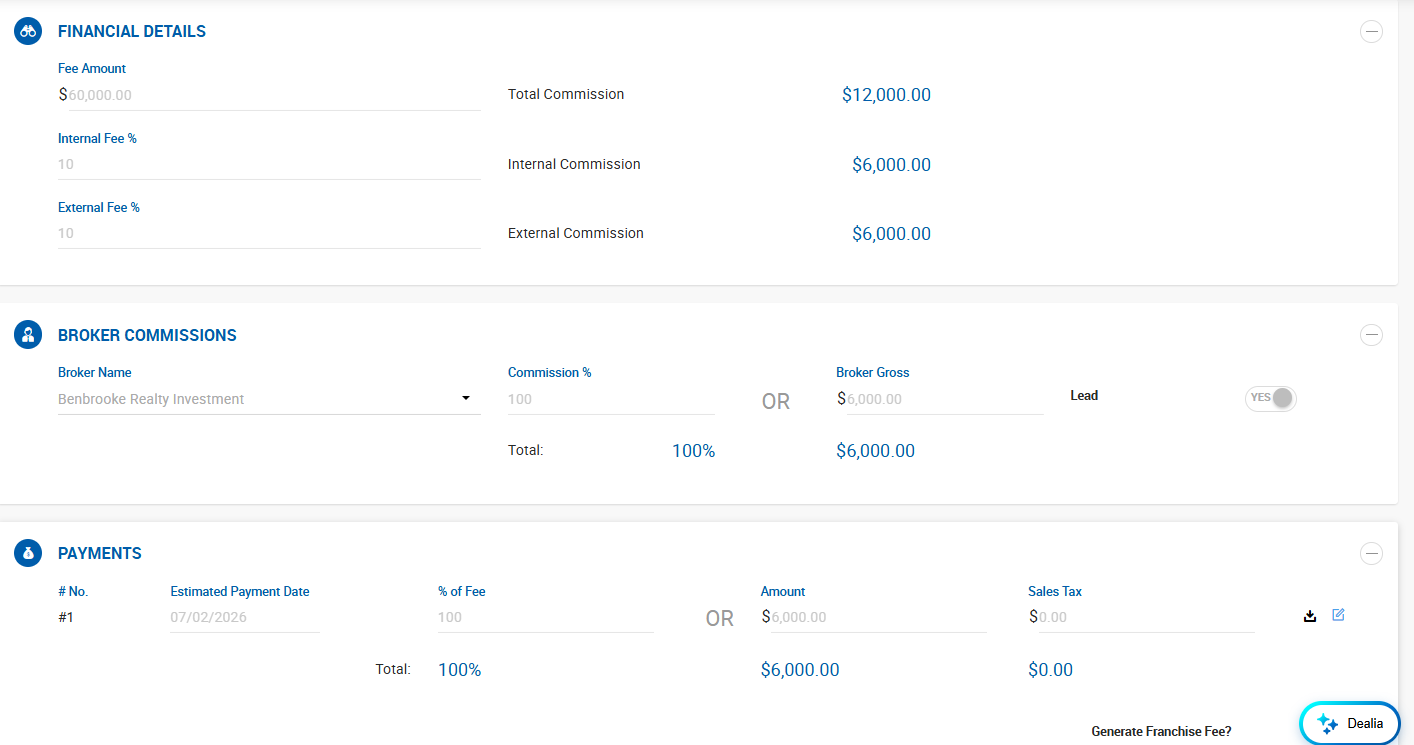
| Field | Description |
|---|---|
| Fee Amount | The total dollar amount of the fee being earned. This is the basis for all commission calculations on the deal. |
| Internal Fee % | Percentage of the fee allocated to internal (house) brokers. |
| External Fee % | Percentage of the fee allocated to external (outside) brokers. |
| Total Commission | Read-only. Reflects the Fee Amount entered. |
| Internal Commission | Read-only. Calculated as Fee Amount × Internal Fee %. |
| External Commission | Read-only. Calculated as Fee Amount × External Fee %. |
If the entire fee is retained by the house, enter 100 in Internal Fee % and leave External Fee % blank or at zero.
Broker Details
Add the brokers who will share the commission:
- Add House Broker — internal brokers. Each broker is assigned a Commission % and one is flagged as the lead broker.
- Add Outside Broker — external brokers receiving a portion of the fee.
Broker splits are then applied to each broker's gross using their assigned split plan, the same way as on Sale and Lease deals.
Property Information
Property Information is still required to close an Other Rep deal. At minimum, a property with a Property Name and Property Address must be linked before the deal can be submitted for closing.
For referral or consulting work where the property is incidental, entering the property address alone is sufficient — the remaining property fields (building size, year built, submarket, and so on) can be left blank.
Additional required property fields configured under Admin > System Settings > Deal Default Settings also apply to Other Rep deals.
Closing an Other Rep Deal
Other Rep deals follow the same closing workflow as Sale and Lease deals:
- Click Close Deal to open the Deal Abstract.
- Review the commission figures and click Submit.
- Enter the Actual Close Date when prompted.
- Internal brokers approve, followed by the Admin or Manager.
Required to close:
- At least one active broker with an active lead broker
- Client company
- Property with name and address
- Required documents, if configured
- At least one payment greater than $0, unless Allow Closing Deals with $0 Commission is enabled
Once closed, receivables, payables, and invoices are generated from the Fee Amount, and a comp is not created — Other Rep deals are excluded from the comp module.
Where Other Rep Deals Appear in Reports
| Report | Behavior |
|---|---|
| Business Summary Report | Included under the Other Deals columns — # Deals, SF, Acres, and Trans. Value. |
| Pipeline Report | Includes a No. of Other Reps count column. |
| Transactions Press Release Report | Excluded — only Sale and Lease deals are included. |
| Broker Ranking Report | Included in the No. of Other Rep column. |