
Overview
Important Dates allows administrators to set up required contract deadlines that appear on Deal Profile and Deal Abstract pages. There are two separate grids — one for Sale deals and one for Lease deals. Important Dates are configured system-wide.
Available Actions
- Add, edit, or delete a date
- Set the display order using the Order field
- Assign a group to each deadline
- Specify the number of days from Contract Execution used to calculate the deadline date
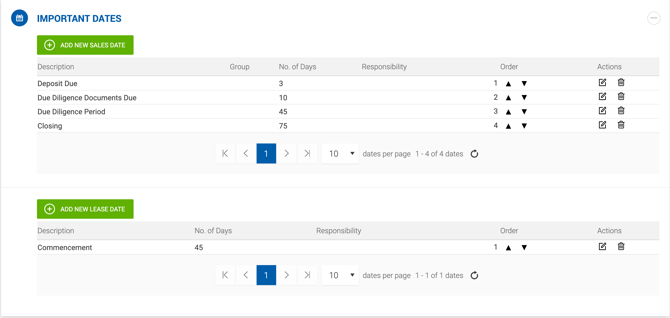
Grid Columns
| Column | Description |
|---|---|
| Description | Required. The deadline title displayed on the deal profile and in reports. |
| Group | Optional. A dropdown for categorizing the type of deadline. No system logic is associated with this field. |
| No. of Days | Number of days added to the Contract Execution date to calculate the deadline. This column can be hidden in related reports via Report Settings. |
| Responsibility | Optional. Indicates which party is responsible for the deadline. Options for Sale deals: Seller, Buyer, Both. Options for Lease deals: Tenant, Landlord, Both. When set, this value is displayed on the Deal Profile under Important Dates and is also selectable directly on the deal form. |
| Order | Determines the display order of deadlines on the deal profile. |