Overview
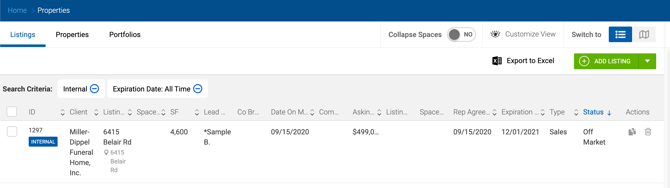
The Listings page displays all listing data in either a grid or map view. Clicking a listing row opens the Edit Listing page.
Permissions:
- Office Admins and Managers can see all listings created by members of their offices.
- Brokers can see listings where they are added as a broker, plus listings from their office in read-only format.
Grid View
Collapsed Spaces Toggle The listing grid can be switched between two views using the Collapse Spaces toggle: 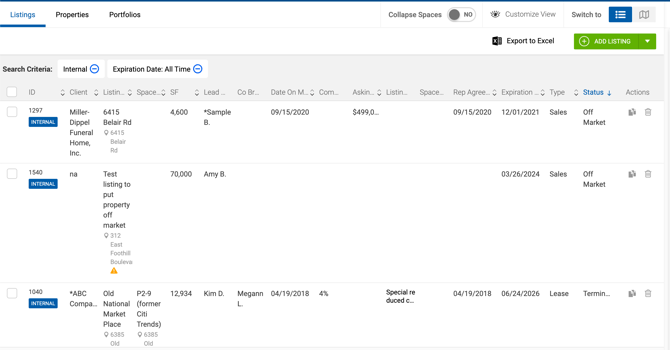
- Standard view — Each row represents a listing/space combination. Listings with multiple spaces appear as multiple rows.
- Collapsed view — All spaces are collapsed into one row per listing. This view shows a different set of columns, including a No. of Spaces column.
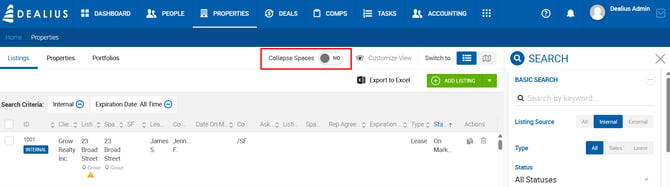
Collapsed View Columns
| # | Column | Description |
|---|---|---|
| 1 | Checkbox | Selecting a listing also selects all spaces inside it. |
| 2 | ID + Label | As standard. |
| 3 | Client | As standard. |
| 4 | Listing Name + Address | As standard. |
| 5 | SF | Space Available SF from the main property if no spaces exist; sum of Space Available SF across all spaces if spaces are present. |
| 6 | No. of Spaces | Total number of spaces added to the listing. |
| 7 | Lead Broker | As standard. |
| 8 | Co-Brokers | As standard. |
| 9 | Date On Market | From the Listing Information section (not space-level). |
| 10 | Commission | As standard. |
| 11 | Asking Price | Range from lowest to highest sale price across spaces. If no spaces, uses the listing-level sale price. If all spaces share the same price, no range is shown. |
| 12 | Asking Rate | Range from lowest to highest asking rate across spaces. If no spaces, uses the listing-level asking rate. Rate type (Per Month/Per Year) defaults to Admin > System Settings > Deal Default Settings > Default Lease Type per Office. |
| 13 | Listing Notes | As standard. |
| 14 | Rep Agreement Executed | As standard. |
| 15 | Expiration Date | As standard. |
| 16 | Type | As standard. |
| 17 | Status | Listing status. |
| 18–19 | Last Updated | As standard. |
Exporting Listings
Two export options are available regardless of the current view mode:
- Properties Only — One row per listing, with fewer columns. Includes the number of spaces per listing.
- Properties & Spaces — One row per listing/property/space combination. Listings with multiple spaces generate multiple rows.
When Collapsed Spaces is active and Properties & Spaces is selected for export, all spaces for the selected listings are included.
Map View
The map view displays listings (not individual spaces) when Collapsed Spaces is enabled. Cards on the left represent listings rather than spaces. The search panel can be opened on the right to refine results. 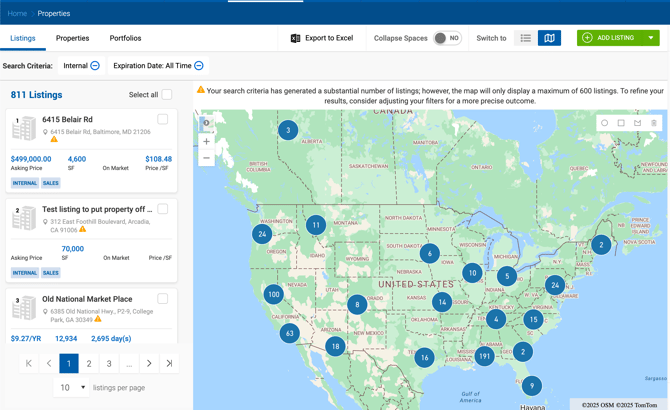
Sale listing cards show:
- Asking Price — lowest price with "+" if multiple prices exist (hover for range)
- Price per SF — lowest value with "+" if prices differ (hover for range)
Lease listing cards show:
- Asking Rate — lowest rate with "+" if multiple rates exist (hover for range)
Clicking a map pin opens a listing summary pop-up. Multiple listings at the same address are merged into a cluster.
Listing Summary Pop-Up — Sale Listings Asking Price, SF, Days On Market, Price/SF, Year Built, and a View More button linking to the Listing Profile.
Listing Summary Pop-Up — Lease Listings Asking Rate per SF, Space Available SF, Building Size SF, Days On Market, Additional Lease Type, Building Class, Year Built, and a View More button linking to the Listing Profile.
Days On Market is calculated as follows:
- On Market — Today minus Date on Market
- Expired — Expiration Date minus Date on Market
- Closed — Deal Closed Date minus Date on Market
- Terminated — Date marked Terminated minus Date on Market
- Off Market — Date marked Off Market minus Date on Market
Listing cards contain two tags indicating whether the listing is Sale or Lease, and Internal or External.
Filters
Click Show Results to apply filters. Click Reset to return all filters to default.
Basic Search
| Filter | Description |
|---|---|
| Keyword | Searches by property/space address, client name, or listing ID. Supports address abbreviations (Road/Rd, Ave/Avenue, St/Street, Blvd, etc.). |
| Listing Source | All, Internal, or External. Defaults to Internal. |
| Type | All, Sales, or Lease. Defaults to All. |
| Status | On Market, In Contract, Expired, Closed, Terminated, Off Market. Defaults to On Market. |
| Filter By | Date On Market or Expiration Date. Defaults to Expiration Date. |
| Time Period | 30, 60, 90, All, or Custom. Defaults to All. Custom reveals a Start & End Date picker. |
| All Brokers | Filter by All Brokers, All Internal Brokers, All Outside Brokers, or specific brokers. Defaults to All Brokers. |
| All Clients | Multi-select dropdown of clients involved in transactions. |
| Address | Text field. |
| City | Multi-select type-ahead field. |
| State | Multi-select dropdown. Radius search is disabled when multiple states are selected. |
| Zip Code | Multi-select field. Radius search is disabled when multiple zip codes are entered. |
| Search Radius (Miles) | Range filter (0–50 miles). No default limit. Requires address, city, and state — or street and ZIP. |
| Property Type | Multi-select dropdown. All selected by default. |
| Space Type | Multi-select dropdown. All selected by default. |
| Building Class | Multi-select dropdown. All selected by default. |
| Submarket | Multi-select dropdown. All selected by default. |
| Square Feet | From/To range. |
| Asking Rate per SF | From/To range with Per Year/Per Month selector. Defaults to Per Year. Searches by space-level Asking Rate if spaces exist; otherwise by listing-level Asking Rate. Hidden when Sale listing type is selected. |
| Lease Type | Multi-select dropdown. Searches space and listing info. Defaults to All. Hidden for Sale listings. |
| Additional Lease Type | Multi-select dropdown. Searches space and listing info. Defaults to All. Hidden for Sale listings. |
| Asking Price | From/To range. Searches by space-level Sale Price if spaces exist; otherwise by listing-level Asking Price. Hidden for Lease listings. |