
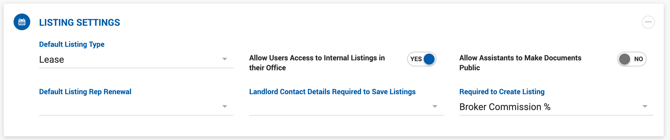
Listing Settings
| Setting | Description |
|---|---|
| Default Listing Type | Sets the default listing type pre-selected on the Add Listing page. |
| Allow Users Access to All Listings in Their Office | Disabled by default. When enabled, Brokers and their Admin Assistants can see all listings from their office, not just their own. |
| Allow Assistants to Make Documents Public | Disabled by default. When enabled, Admin Assistants can view and update the Public toggle on the Listing > Documents tab. Public documents are accessible via the Dealius API if any API integration is active. |
| Default Listing Rep Renewal | Sets the default Rep Renewal value pre-selected on the Add Listing page. |
| Landlord Contact Details Required to Save Listings | Multi-select. Fields selected here become required in the Landlord Contact Details section before a listing can be saved. |
| Required to Create Listing | Dropdown with the following options: Asking Price (Sale listings), Asking Rate (Lease listings), Broker Commission %, Client Information (External listings), Outside Broker (External listings). Broker Commission % is selected by default and maintains the existing listing creation flow. When deselected, the Commission % field is no longer required and listings can be saved with it empty. |
Property Settings
Properties Settings, found under Admin > System Settings, allows Office Admins to control which user roles can edit properties, which fields are required when creating a property or space, and how space details are populated.
Can Edit Property A multi-select dropdown of available user roles. All selected roles are permitted to edit property records after creation. Options:
- Office Admin (selected by default)
- Broker
- Manager
- Admin Assistant
Required to Create Property A multi-select dropdown of fields that must be completed before a property can be saved. Available options:
- Building SF
- Submarket
- Property Address
- Property Type
- SF Available
Required to Create Space A multi-select dropdown of fields that must be completed when creating a space. Available options:
- Space Address
- Space Available (SF)
- Space Type
Automatically Populate Space Details from Property A toggle. When enabled, space detail fields are automatically pre-populated from the parent property when a new space is created.
