
Listing Information
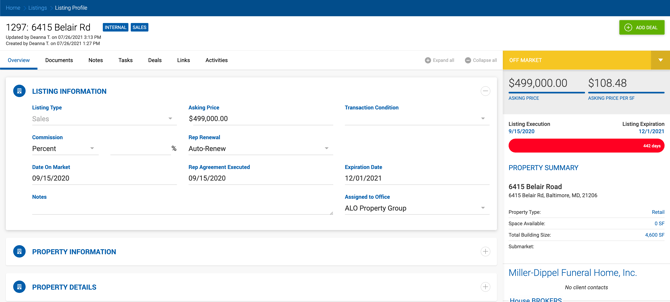
| Field | Description |
|---|---|
| Listing Name | Used as the property name when assigned to a deal. |
| Listing Type | Lease or Sales. Determines which deal types the listing can be assigned to. |
| Asking Rent per SF | Numeric field. Exported as a property setting. |
| Lease Rent Type | Per Year or Per Month. Sets the default rent type for the listing and any spaces added to it. When assigned to a deal, this value carries over from the space. Not overridden if deal values have already been calculated. |
| Lease Type | Manageable under Admin > Manage Data. Exported as a property setting. |
| Commission | Fixed, Percent, or $/SF. Percent exports as Rep Fee % for internal brokers. Fixed exports as commission if Transaction Total is calculated. $/SF is available for Lease listings only — broker commission is calculated based on dollar amount per SF. If a listing or space with a different commission type is added to a deal, a confirmation prompt appears. If confirmed, the deal profile settings are overridden (the Calculation screen is not affected). |
| Rep Renewal | Auto-Renew or Month to Month. Informational only; not exported to a deal. |
| Date On Market | Date field. Not exported to a deal. |
| Rep Agreement Executed | Date field. Not exported to a deal. |
| Expiration Date | Date field. Used to trigger Listing Expiration Reminders. Not exported to a deal. |
| Notes | Free text, up to 8,000 characters. Not transferred to a deal. |
Property Information
| Field | Description |
|---|---|
| Single-Tenant / Multi-Tenant / Portfolio | Property occupancy classification. |
| Property Type | Manageable under Admin > Manage Data. Exported as a property setting. |
| Property Configuration | Single-select dropdown with fixed values. |
| Asking Cap Rate | Numeric, max 8 characters. |
| NOI | Dollar amount, max 15 characters. |
| Managed By House | Toggle. Available for Lease listings only. Informational; not exported to a deal. |
| Square Feet Available | Numeric. Exported as a property setting. Not editable on the listing — must be edited on the Property Profile. |
| Building Size (SF) | Total size of the property. |
| Lot Size (AC) | Rentable size in acres. |
| Submarket | Dropdown. Exported as a property setting. |
| New Construction | Yes/No toggle. Sale listings only. |
| Urban | Yes/No toggle. Sale listings only. |
| Street Address | Exported as the property address. |
| Unit / Suite # | Free text. |
| City | Free text. |
| State | Dropdown with US states, Canadian provinces, and Mexican states. |
| Zip Code | Numeric. Valid formats: 12345 or 12345-1234. |
| Property Image | Max 5MB. Exported as the property image. |
| County | Auto-populated from the address lookup, or manually selected after State is set. |
| Township | Auto-populated from the address lookup, or manually entered. |
| Latitude / Longitude & Map | Enter coordinates manually and click Update Map to apply, or drag the map pin to update coordinates automatically. Selecting an address from the lookup auto-populates City, State, Zip, and map coordinates. |
Property Details
Fields in this section vary by Property Type. If the selected type has no additional fields, the message "No additional fields available for the selected property type" is shown.
Multi-Family: Year Built, Number of Floors, Number of Beds, Current Occupancy %, Heat (Y/N), AC (Y/N), Units Individually Metered (Y/N), Parking Spaces.
Land: Min Divisible SF, Min Divisible Acres, Development Capacity, Zoning, Frontage, Rail Status, Rail Line, Easement, Structure On-site (Y/N), Gas, Water, Sewer, Power (Y/N).
Retail: Retail SF, Number of Floors, Number of Buildings, Year Built, Current Occupancy %, Tenancy, Parking Spaces, Parking Ratio, Anchor Tenants, Zoning, Frontage, Rate Type, Rate Amount, Rate Frequency, Lease Expiration.
Industrial: Number of Floors, Number of Buildings, Year Built, Current Occupancy %, Tenancy, Number of Int. Docks, Number of Ext. Docks, Number of GL Doors/DID, Number of DH/Truck-Level Doors, Rail Status, Number of Cranes, Parking Spaces, Anchor Tenants, Zoning, Rate Type, Rate Amount, Rate Frequency.
Office: Number of Floors, Number of Buildings, Year Built, Current Occupancy %, Tenancy, Parking Spaces, Zoning.
Client Information
Standard form. Imported to a deal when the listing is assigned. Click the X button to clear the company. If contacts from the company have been added, a confirmation prompt appears: "Deleting [Company Name] will clear associated contacts as well." Confirming clears both the Company Information and Contact Details sections.
Client Contact Details Standard form. Imported to a deal.
Landlord Contact Details / Seller Information Business name and billing information for the rep company on this listing (label varies by rep type).
Broker Partnership Standard form. Transferred to a deal. The Broker Commission % field is required by default. This can be changed under Admin > System Settings > Listing Settings > Required to Create Listing. When deselected, the Commission % field is not required and the listing can be saved with it empty.
Spaces
Used when a property has multiple distinct spaces within one building. Each space includes: name, space type, rent per SF, lease rent type, space available, lease type, address, and notes. Spaces can be removed at any time. Each space has its own status. When a listing with multiple spaces is assigned to a deal, a prompt appears to select which space to use.
Space Details — Sales Listings Only
Each space on a Sales listing has additional fields:
| Field | Description |
|---|---|
| Credit Rating Agency | Fitch, S&P, Moody's, or Not Rated. |
| Credit Rating | Text, max 4 characters. |
| Annual Rent | Dollar amount. |
| Rent Per SF | Calculated: Annual Rent ÷ Space Available SF. |
| Ownership Structure | Fee Simple, Ground Lease, Leasehold, or Other. |
| Lease Structure | Full Service, Gross, NNN, NN, Hybrid, or Other. |
| Tenant Type | Corporate, Franchisee, or Private. |
| Guarantor | Corporate, Franchisee, No Guarantor, or Personal. |
| Security Deposit | Dollar amount. |
| Landlord Responsibilities | Multi-select: CAM, Exterior Utility Connection, Insurance, None, Other, Parking Lot, Roof, Structure. |
| Year Built | 4-digit year. |
| Year Renovated | 4-digit year. |
| Occupancy at Sale | 0–100%. |
| Rent Commencement | Date field. |
| Lease Expiration | Date field. |
| Lease Term Remaining | Text, max 20 characters (e.g., 15 Years, 9.75 Years). |
| Increases | Plain text (e.g., 10% Every Five Years). |
| Options | Plain text (e.g., Four (4), Five (5) Year). |
Contiguous Spaces
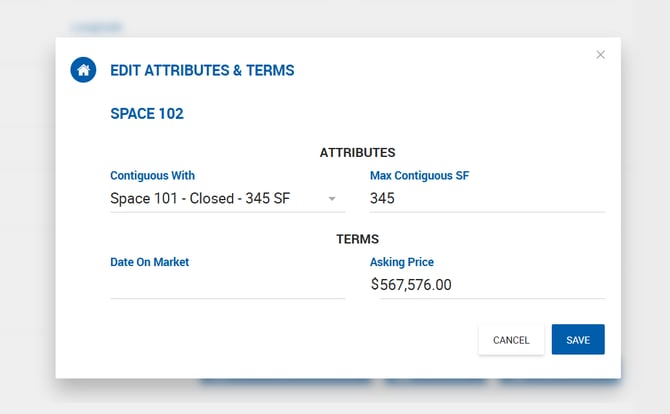
Spaces can be linked to other spaces in the same listing as contiguous. Click Edit Attributes & Terms to access the following:
- Contiguous With — Dropdown listing all spaces in the listing by name, status, and SF. One, several, or all spaces can be selected.
- Max Contiguous SF — Read-only. Auto-calculated as the sum of Space Available SF for the current space and all selected contiguous spaces.
Required Fields
Required to Create a Property (applies to listings as well) — Configurable under Admin > System Settings > Properties Settings: Space Available (SF), Space Name, Space Type, Space Address.
Required to Create a Space — Configurable as a multi-select under the same settings: Space Available (SF), Space Name, Space Type, Space Address.
Required to Create a Listing — Configurable under Admin > System Settings > Listing Settings. Nothing is selected by default:
- Asking Rate (Lease listings)
- Asking Price (Sale listings)
- Outside Broker (External listings)
When Asking Rate or Asking Price is required, the requirement applies to both the listing-level field and the corresponding space field.