
Overview
The Lease Renewal Reminder notifies brokers and managers when a closed deal's lease is approaching expiration. The goal is to help brokers re-engage with clients in time to either renew the lease or assist them in finding a new space.
How the Lease Expiration Date is calculated: Lease Expiration Date = Start Date + Term (pulled from the Term Date field on the deal profile).
Reminder notifications are sent once daily at 1:00 AM EST and include a link to the deal profile and the Lease Expiration Date.
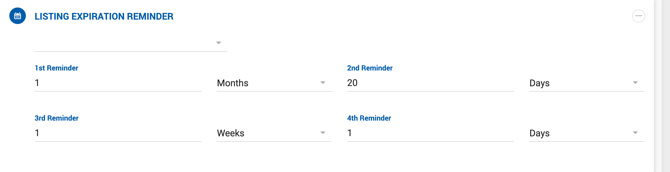
Office-Level Configuration
Managers and Office Admins can configure reminder intervals per office under their assigned office settings. Up to four reminder periods can be set, each defined by a number and time unit (Days, Weeks, or Months) before the Lease Expiration Date.
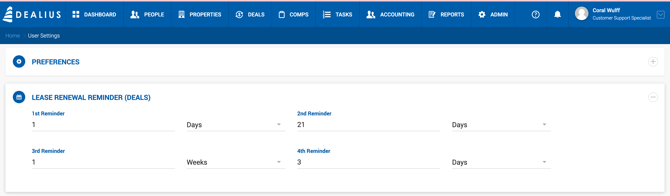
User-Level Configuration
All user roles, including brokers, can manage their own reminder preferences under User Settings, accessible by clicking the link under the profile photo. Individual users can enable, disable, or adjust the reminder intervals independently of the office-level settings.
Unsubscribing from a Specific Deal
It is possible to opt out of renewal reminders for individual deals. Each reminder email includes an unsubscribe link specific to that deal. Clicking the link redirects to a confirmation page, after which reminders for that deal will stop.
Note: Once unsubscribed from a deal's reminders, there is no way to re-add that deal to the reminder list.