Overview
Invoice Layout Settings allow Office Admins to control what appears on printed and emailed invoice PDFs, including footer text, date display, payment visibility, and custom field labels.
Settings
Display Text on Invoice Footer A free text field for adding a notification line at the bottom of every invoice, displayed below the wire instructions. Maximum 110 characters.
Invoice Print Date Controls which date is shown on the invoice PDF. Options:
- Original Print Date — The date the invoice was first printed.
- Current Date — Today's date at the time of printing.
- Actual Deal Close Date — Displays the Actual Close Date from Deal Profile > Important Dates > Actual Close Date. For Lease deals, the Lease Execution Date is used instead.
Invoice Payments Print Preference Controls which payments are shown in the invoice payment table. Options:
- Current Invoice Payment Only — Displays only the current invoice.
- Overdue or Current Invoice Only — Displays overdue and/or current invoices.
- Print All Payments Due — Displays all payments in a table.
Include Bill To Billing Contact Email(s) When enabled, billing contact email addresses are displayed on the invoice. If the deal has multiple billing contacts, all of their emails are shown.
Invoice Instructions Controls whether the Invoice Instructions field content from the deal profile is displayed on the invoice. 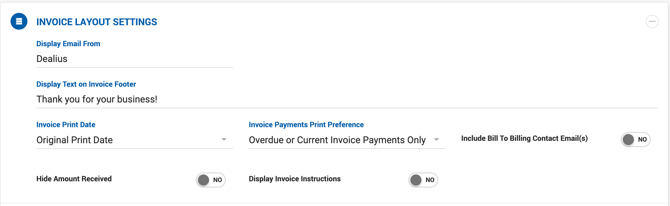
Customize Titles
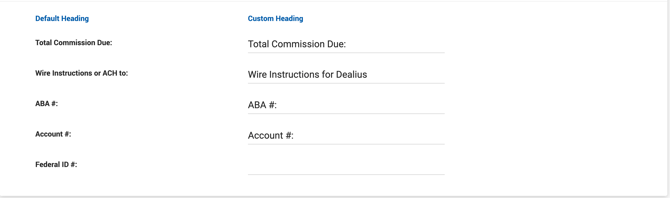
The following field labels on the Office Bank Information section of the invoice PDF can be customized with free text:
- Total Commission Due
- Wire Instructions or ACH to
- ABA #
- Account #
- Federal ID #