
Overview
The Invoice Due Reminder sends email and in-app notifications to users before an invoice becomes due. Reminders can be configured at both the office level (by an Admin) and the individual user level (via User Settings). The notification is disabled by default for all users.
Office-Level Configuration
Office Admins can configure the reminder schedule under Admin > System Settings > Invoice Due Reminder. The setting includes an office dropdown and up to four reminder fields.
Default values:
- 1st Reminder — 45 days before the Invoice Due Date
- 2nd Reminder — 30 days before the Invoice Due Date
- 3rd Reminder — not set by default
- 4th Reminder — not set by default
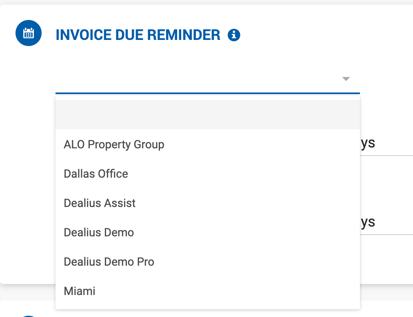
User-Level Configuration
The same reminder settings are available to individual users under User Settings > Email Notifications. Users can enable or disable the notification using the corresponding toggle. The notification is disabled by default.
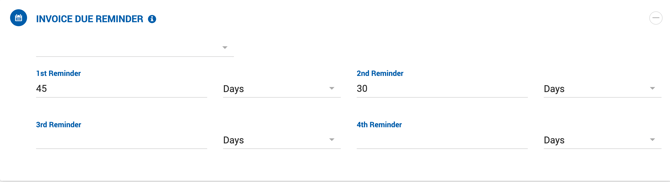

Who Receives the Reminder
| Role | Receives Notifications For |
|---|---|
| Office Admin | All invoices from their office. |
| Broker | Invoices on their own deals. |
| Admin Assistant | Invoices based on the broker(s) they are assigned to. |
| Manager | Invoices on deals they have approved. |
| Broker/Manager | If assigned to a deal that is also from their office, only one notification is generated — not two. |
| Deal Approver | Invoices on deals they approved. If the approver also falls into one of the above categories, only one notification is sent. |