Overview
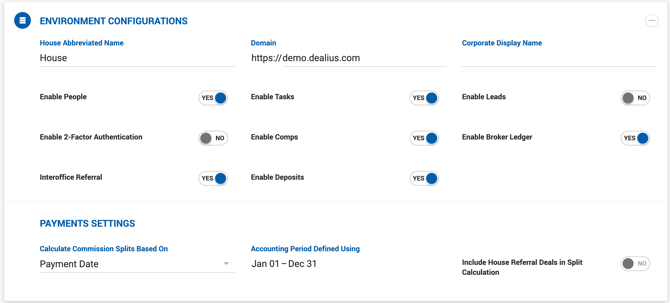
The Environment Configuration section allows Admins to update core instance-level settings such as the house name, domain, commission split calculation method, and fiscal year. This section is accessible to the Admin role only.
Settings
House Abbreviated Name A short name used in labels throughout the system. For example, if the abbreviated name is set to House, labels such as House Gross will use that term.
Domain The URL displayed in the browser address bar for this instance. The https:// prefix is fixed and read-only — enter only the domain itself, for example: demo.dealius.com.
Calculate Commission Splits Based On Determines whether broker commission splits are calculated using the Closing Date (Actual Close Date or Estimated Close Date) or the Payment Date. This setting can only be changed if no deals have been entered in the system yet. See the Broker Commission and Payments article for full details on how splits are calculated under each option.
Accounting Period Defined Using Sets the fiscal year used for YTD calculations and split thresholds. Defaults to the Calendar Year. Admins can configure a custom fiscal year start date — the end date is automatically calculated as Start Date minus 1 day. This should be configured before any deals are entered in the system.
Include House Referral Deals in Split Calculation When enabled, gross commission earned on deals marked with the House Referral toggle is counted toward the broker's split threshold calculations.
Feature Toggles
| Setting | Description |
|---|---|
| Enable People | Turns the People module on or off. |
| Enable Tasks | Turns the Tasks module on or off. |
| Enable 2-Factor Authentication | Turns 2FA on or off for the instance. |
| Interoffice Referral | Turns the Interoffice Referral feature on or off. |
| Enable Deposits | Adds the Deposits section to the deal profile when enabled. |