
Overview
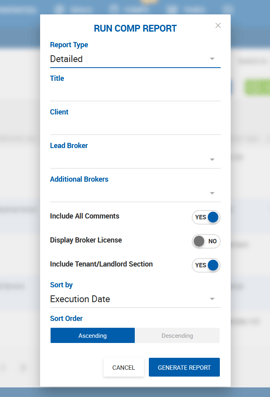
The Detailed Comp Report provides an in-depth view of individual comps, with building and transaction details laid out two comps per page. It is available under the Run Report button by selecting Detailed from the report type dropdown.
Report Parameters
| Field | Description |
|---|---|
| Title | Short free text label for the report. |
| Client | Short free text. Displayed on the cover page under Prepared For. |
| Lead Broker | Single-select dropdown of active brokers. Auto-populates if the current user is a broker. |
| Additional Brokers | Multi-select dropdown. Up to 3 brokers can be selected. Listed on the cover page after the lead broker. |
| Include All Comments | Enables or disables the Comments section in the report, pulled from the Comp Notes field. |
| Display Broker License | Shows or hides broker licenses on the cover page. |
| Include Tenant/Landlord Section | Shows or hides client information for each comp. Labeled Buyer/Seller for sale comps. |
| Sort By / Sort Order | Same options as the Summary Comp Report. |
Report Layout
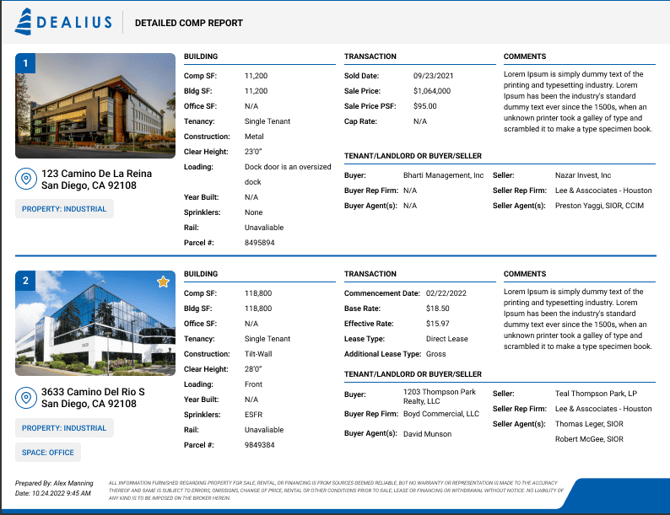
The report includes a cover page and map page (same as the Summary Report), followed by content pages displaying 2 comps per page. If a comp contains too much data in one section, it occupies the full page.
Building Information
Fields in the Building section vary based on the property type category assigned to the property or space used in the comp.
| Field | Retail | Industrial | Land | Multi-Family | Office | Other |
|---|---|---|---|---|---|---|
| Comp Size | ✓ | ✓ | — | ✓ | ✓ | ✓ |
| Building Size | ✓ | ✓ | — | ✓ | ✓ | ✓ |
| Building Class | ✓ | — | — | ✓ | ✓ | ✓ |
| RSF | ✓ | — | — | — | ✓ | — |
| Center Type | ✓ | — | — | — | — | — |
| No. of Spaces | ✓ | — | — | ✓ | — | — |
| Parking Ratio | ✓ | — | — | — | ✓ | ✓ |
| Parking Spaces | ✓ | — | — | ✓ | ✓ | ✓ |
| Anchor Tenants | ✓ | — | — | — | — | — |
| Frontage Traffic Count | ✓ | — | — | — | — | — |
| Tenancy | ✓ | — | — | ✓ | — | ✓ |
| Units | ✓ | — | — | — | — | — |
| No. Stories | ✓ | — | — | — | — | — |
| Land Size (Acres) | ✓ | ✓ | — | ✓ | ✓ | ✓ |
| Land SF | — | ✓ | — | ✓ | ✓ | ✓ |
| Tax ID/APN | ✓ | — | — | — | — | — |
| Industrial SF | — | ✓ | — | — | ✓ | — |
| Office SF | — | ✓ | — | — | ✓ | — |
| Primary Use | — | ✓ | ✓ | — | ✓ | ✓ |
| Secondary Use | — | ✓ | ✓ | — | — | ✓ |
| Ceiling Height Min | — | ✓ | — | — | — | — |
| Ceiling Height Max | — | ✓ | — | — | — | — |
| No. of Int. Docks | — | ✓ | — | — | — | — |
| No. of Ext. Docks | — | ✓ | — | — | — | — |
| Total Doors | — | ✓ | — | — | — | — |
| Clear Height | — | ✓ | — | — | — | — |
| Power | — | ✓ | — | — | — | — |
| Year Built | — | ✓ | — | — | — | — |
| Buildable SF | — | — | ✓ | — | — | — |
| Permitted FAR | — | — | ✓ | — | — | — |
| Zoning | — | — | ✓ | — | — | ✓ |
| Parcel # | — | — | ✓ | — | — | — |
| Property SF | — | — | — | ✓ | — | — |
| No. of Floors | — | — | — | ✓ | ✓ | — |
| No. of Buildings | — | — | — | ✓ | — | — |
| Average Size Units | — | — | — | ✓ | — | — |
| Unit Mix | — | — | — | ✓ | — | — |
| Current Occupancy | — | — | — | ✓ | — | — |
| Retail SF | — | — | — | — | ✓ | — |
| Space Size | — | — | — | — | — | ✓ |
| Land Size (Acres) | — | — | — | — | ✓ | — |
All other property types use the standard field set from the Summary Comp Report.
Transaction Information
Transaction fields differ between lease and sale comps and are displayed on each comp page.
Lease Comps Commencement Date, Base Rate, Effective Rate, Lease Type, Additional Lease Type.
Sale Comps Close Date, Sold Price, Price per SF, Cap Rate.
Dynamic Field Selection
The report viewer allows users to show or hide specific fields. Fields are grouped by section, and each section is collapsible and expandable by clicking.
Lease Comps — Transaction Fields
Execution Date, Commencement Date, Expiration Date, Term, Transaction Value, Base Rate, Effective Rate, Asking Rate, Avg Escalations, Free Rent, TI Allowance, TI Notes, NNN per SF, CAM per SF, TICAM, OPEX, Utilities, Taxes, Insurance, Lease Type, Additional Lease Type.
Sale Comps — Transaction Fields
Close Date, Asking Price, Sold Price, Price per SF, CAP Rate, NOI, Transaction Condition, Investment Sale, Utilities (from property details), Tax (from property details), Insurance (from property details).
Tenant/Landlord Section (Lease Comps)
Tenant, Tenant Rep Firm, Tenant Agent(s), Landlord, Landlord Rep Firm, Landlord Agent(s).
Buyer/Seller Section (Sale Comps)
Buyer, Buyer Rep Firm, Buyer Agent(s), Seller, Seller Rep Firm, Seller Agent(s).
Users can hide individual fields within these sections but cannot reorder them.