
Overview
The Transaction Information section is a critical part of every Lease Deal profile. It captures key financial, timing, and administrative details about the transaction. Always click the green Save button after making any changes.
For additional lease-specific financial fields, see the Additional Transaction Information section.
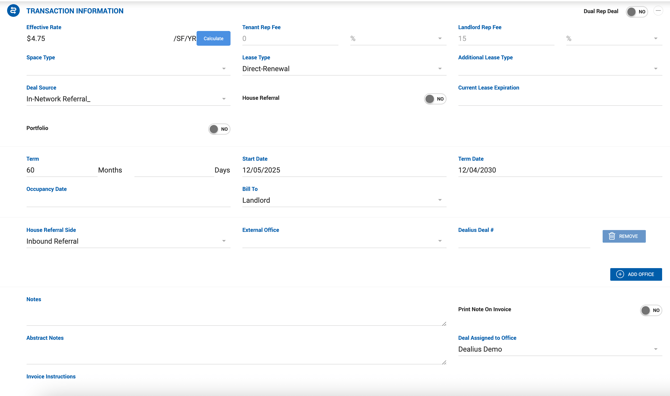
Field Definitions
| Field | Description |
|---|---|
| Effective Rate | Read-only on the deal profile. To populate this field, click the blue Calculate button to open the Lease Calculator. |
| Dual Rep | When set to Yes, indicates your company is representing both sides of the deal in-house. Enables entry of all details in one deal file, with billing, documents, and commissions split between both sides. |
| Space Type | For mixed-use properties, specifies the individual space type. |
| Lease Type | The type of lease: Assignment, New, Renewal, or Sublease. |
| Additional Lease Type | Secondary lease type classification. |
| Deal Source | Tracks where the deal originated from. |
| House Referral | Enable if the deal was referred to you internally, eliminating the need to source it yourself. |
| Current Lease Expiration | The expiration date of the tenant's existing lease. |
| Term | Expected lease duration in months. |
| Start Date | Lease commencement date. |
| Term Date | Lease expiration date, calculated from Start Date + Term. |
| Occupancy Date | Expected move-in date. |
| Bill To | Selects which party should be billed. |
| Submarket | The geographic or economic subdivision of the market associated with the deal. |
| Notes | Free text field for additional deal comments. |
| Abstract Notes | Notes displayed on the Deal Abstract page and its full print view. |
| Print Notes on Invoice | When enabled, transaction notes are printed on the invoice PDF. |
| Deal Assigned to Office | Associates the deal with a specific office. Used when multiple offices exist within your company. |
| Portfolio | Informational toggle only. Can be set to Yes or No. |