
Overview
Deposits can be tracked directly on a deal profile when the Enable Deposits setting is turned on under Admin > System Settings. This setting is disabled by default. The Deposits section is available on Sale and Lease deals only — Other Rep deals, Listings, and Comps do not include this section.
Deal Profile — Deposits Section
The Deposits section appears on the deal profile with two action buttons: Add Deposit and Add Withdrawal. Both share the same five fields: 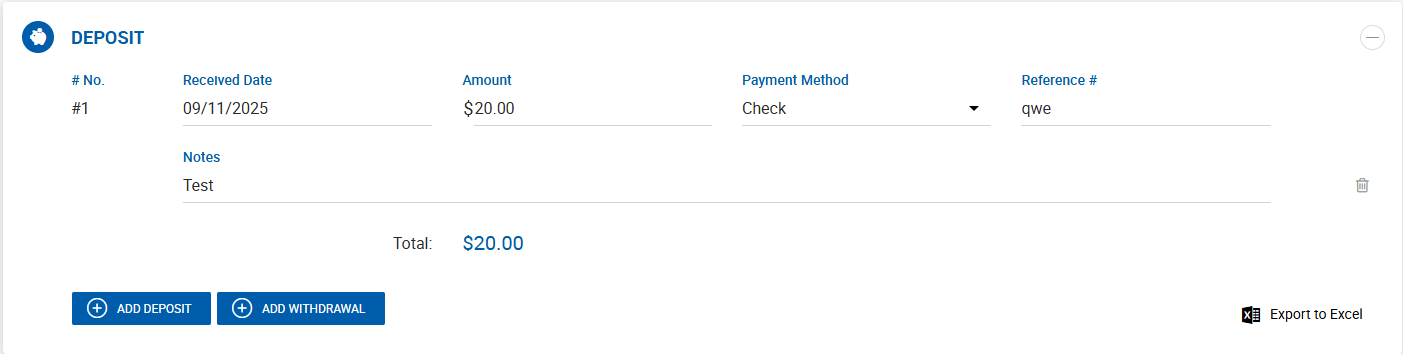
| Field | Description |
|---|---|
| Received Date | Date the deposit was received. For withdrawals, this is the Withdraw Date. |
| Payment Method | Method used for the deposit or withdrawal. |
| Reference # | Reference number for tracking purposes. |
| Amount | Dollar amount. Withdrawals are always recorded as a negative figure. |
| Notes | Free text notes. |
Key rules:
- Deposits can be added by any user role with access to the deal.
- Deposits can be added regardless of deal status: Active, Pending Close, or Closed.
- Deposit amounts are not validated against other deal financials and do not affect expected or actual payment dates from the Payments section.
- Deposits do not participate in any other accounting calculations.
Running Total
A total line at the bottom of the section displays a running balance across all deposits and withdrawals. For example, a $10,000 deposit and a $3,000 withdrawal results in a total of $7,000. The total can display as a positive or negative figure.
Deposits can be exported to Excel directly from this section on the deal profile.
Deal Abstract
The Deposits section is also reflected on the Deal Abstract, displaying the same information as the deal profile.
Receivables — Using Deposit
The Apply Receipt screen includes a Using Deposit? toggle, defaulted to No. When enabled, the receivable payment is marked as covered by a deposit.
The Receivables Export to Excel includes a Deposit column displaying Yes or No for each payment based on the Using Deposit? setting.