
Permissions
| Setting | Description |
|---|---|
| Show Brokers Across All Offices | When ON, users can add any broker from any office to a deal. When OFF, the broker list is restricted to the deal's assigned office. |
| Allow Brokers to Delete Deals | ON by default. When OFF, only System Admins and Office Admins can delete dead deals. |
| Allow Brokers to Delete Documents | ON by default. When OFF, only System Admins and Office Admins can delete documents on deals and listings. |
| Allow Brokers to Print Invoice Prior to Closing Deal | ON by default. When OFF, brokers cannot download or print an invoice until the deal is closed. |
| Allow Admin Assistant to Delete Documents | OFF by default. When OFF, only System Admins and Office Admins can delete documents on deals and listings. |
| Allow Assistants to Print Invoices Prior to Deal Closing | OFF by default. When ON, Admin Assistants can see the Print Invoice option on the deal abstract for active and pending close deals. |
| Billing Preference Required to Close Deal | When set to Yes, the Billing Preference field must contain a value before a deal can be submitted for closing. |
Here's the rewritten version based on the document and both screenshots:
Deal Default Settings
A reference guide to all deal-related configuration options available under Admin > System Settings > Deal Default Settings.
Permissions
| Setting | Description |
|---|---|
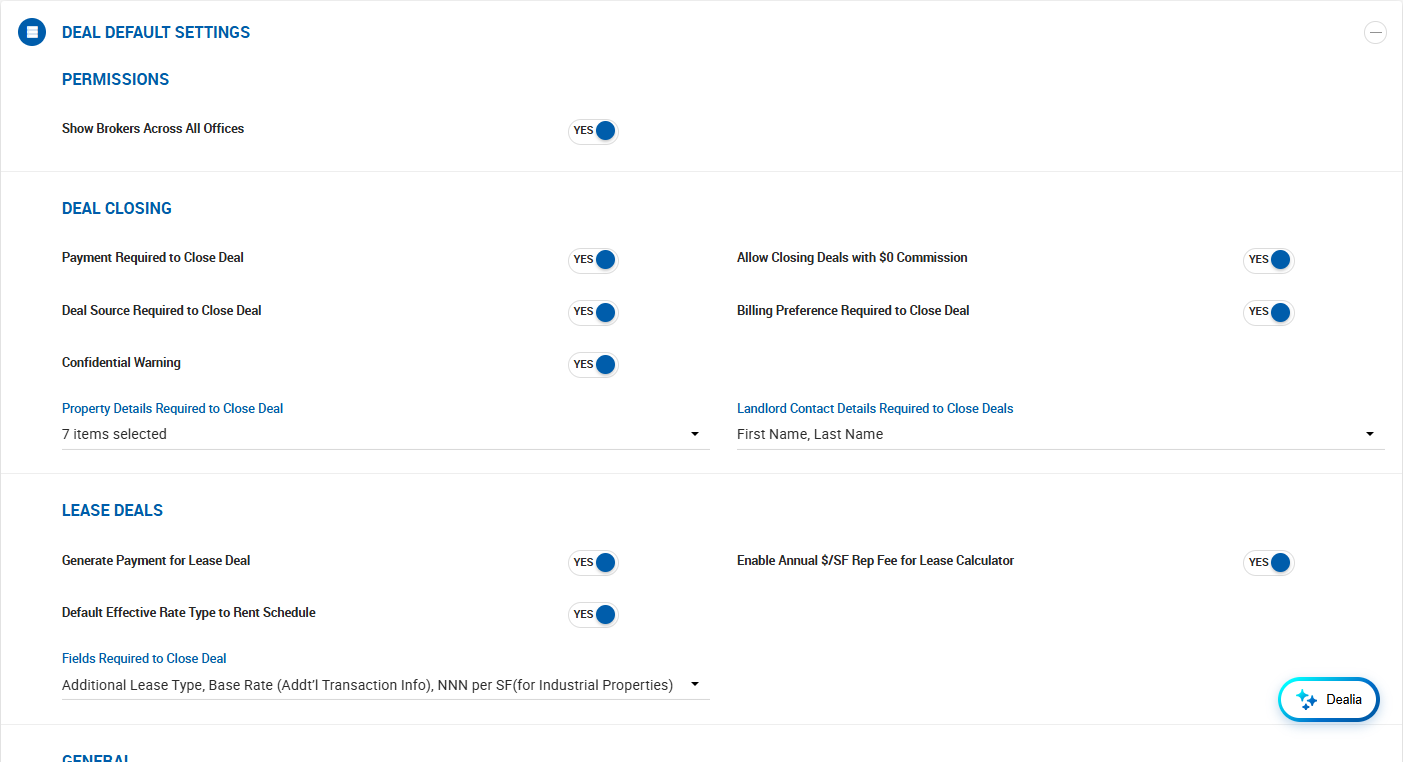
| Show Brokers Across All Offices | When ON, users can add any broker from any office to a deal. When OFF, the broker list is restricted to the deal's assigned office. |
| Allow Brokers to Delete Deals | ON by default. When OFF, only System Admins and Office Admins can delete dead deals. |
| Allow Brokers to Delete Documents | ON by default. When OFF, only System Admins and Office Admins can delete documents on deals and listings. |
| Allow Brokers to Print Invoice Prior to Closing Deal | ON by default. When OFF, brokers cannot download or print an invoice until the deal is closed. |
| Allow Admin Assistant to Delete Documents | OFF by default. When OFF, only System Admins and Office Admins can delete documents on deals and listings. |
| Allow Assistants to Print Invoices Prior to Deal Closing | OFF by default. When ON, Admin Assistants can see the Print Invoice option on the deal abstract for active and pending close deals. |
| Billing Preference Required to Close Deal | When set to Yes, the Billing Preference field must contain a value before a deal can be submitted for closing. |
Deal Closing
| Setting | Description |
|---|---|
| Allow Closing Deals with $0 Commission | OFF by default. When ON, deals can be closed with $0 or no payments. No accounting items are generated. A confirmation prompt appears: "Are you sure you want to close this deal without payments? No accounting data will be generated." |
| Payment Required to Close Deal | When ON, at least one payment greater than $0.00 must be included before brokers can close a deal. Does not apply to other user roles. |
| Deal Source Required to Close Deal | OFF by default. When ON, the Deal Source field must contain a value before a deal can be submitted for closing. |
| Billing Preference Required to Close Deal | When ON, the Billing Preference field must be filled in before closing. |
| Confidential Warning | Enabled by default. When ON, the Confidential pop-up appears during the deal approval/closing process for Office Admins and Managers. When OFF, the pop-up is suppressed. The toggle still appears on the deal abstract but is disabled by default. |
| Property Details Required to Close Deal | Multi-select. Fields selected here must be completed before a deal can be closed. Options: City, State, Zip Code, Square Feet (excludes Other Rep deals), Property Type (includes Space Type if a space is used), Submarket, No. of Units (Multi-Family only). |
| Landlord Contact Details Required to Close Deals | Multi-select. Fields selected here must be completed in the Landlord Contact Details section before closing. Options: First Name, Last Name, Title, Email Address, Office Phone, Mobile Phone. |
Lease Deals
| Setting | Description |
|---|---|
| Generate Payment for Lease Deal | When ON, the Estimated Close Date auto-fills the first Estimated Payment Date during deal creation, and a 100% payment is auto-generated. |
| Enable Annual $/SF Rep Fee for Lease Calculator | When ON, adds an Annual $/SF option to the Rep Fee dropdown in the Lease Calculator. Formula: Annual $/SF Rep Fee × SF ÷ 12 × Months in the period. |
| Default Effective Rate Type to Rent Schedule | OFF by default. When ON, the Effective Rate displays as SF/MO instead of SF/YR when the rent schedule uses Rate per SF per Month. |
| Fields Required to Close Deal | Multi-select. Fields selected here must be completed before a lease deal can be closed. Options include Base Rate (Additional Transaction Info), Additional Lease Type, and NNN per SF (for Industrial properties). |
General
| Setting | Description |
|---|---|
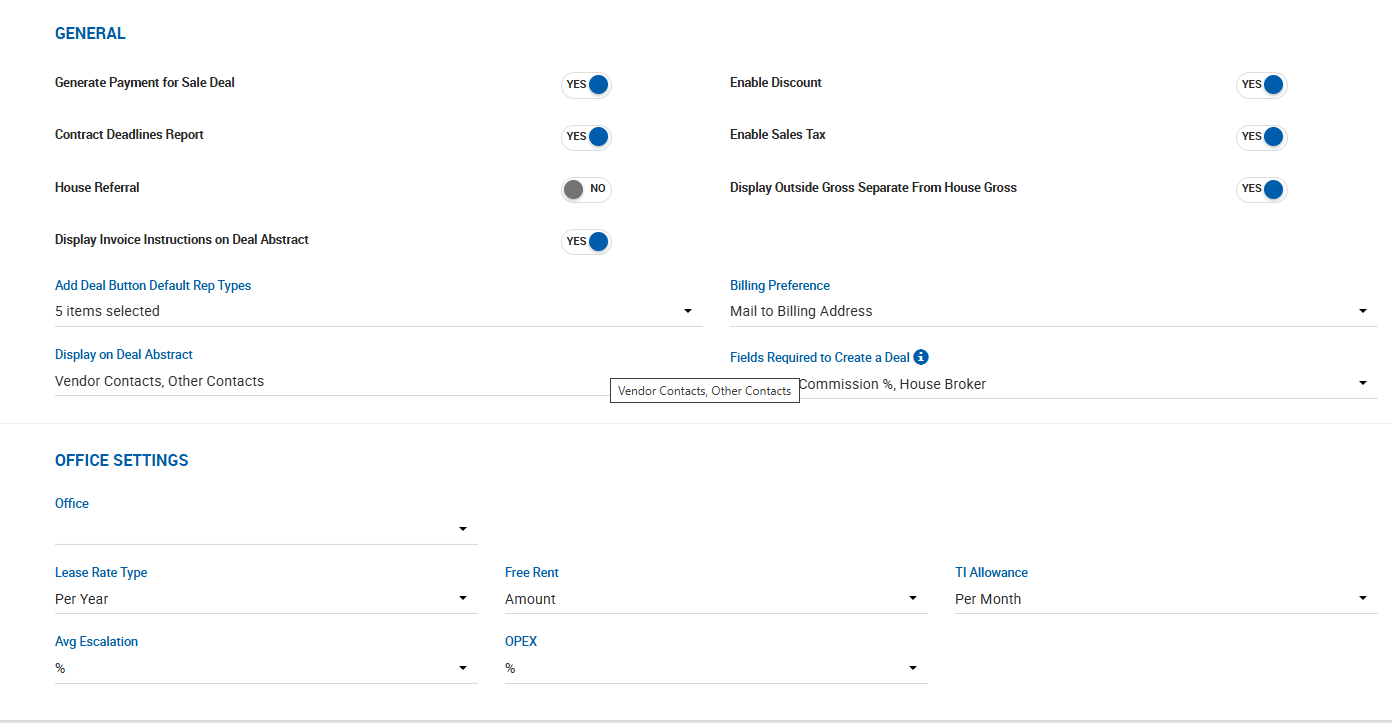
| Generate Payment for Sale Deal | When ON, the Estimated Close Date auto-fills the first Estimated Payment Date during deal creation, and a 100% payment is auto-generated. |
| Enable Discount | Enables or disables the ability to apply a discount to the total deal commission. |
| Contract Deadlines Report | When ON, the Contract Deadlines PDF can be downloaded from the Deal Abstract for Sale deals. |
| Enable Sales Tax | Enables or disables sales tax on receivables. When enabled, a Sales Tax button appears on each deal allowing a % value to be entered. Tax is applied to all payments and reflected on invoices and receivables as part of Amount Due. Does not affect payables, Broker Net, or House Net. |
| House Referral | Sets the default value of the House Referral toggle in Transaction Information on the deal profile. |
| Display Outside Gross Separate From House Gross | When ON, House Gross includes only internal broker grosses regardless of outside broker payment arrangements. Affects the deals list, deal profile sidebar, accounting sidebars, and accounting reports. |
| Display Invoice Instructions on Deal Abstract | Controls whether the Invoice Instructions field is displayed on the deal abstract. |
| Add Deal Button Default Rep Types | Multi-select. Restricts which rep types appear in the Add Deal dropdown. At least one must be selected. Options: Tenant Rep, Landlord Rep, Buyer Rep, Seller Rep, Other Rep. |
| Billing Preference | Multi-select default value for the Billing Preference field. Options: Email, Hand Deliver by Broker, Mail to Billing Address, Managed Property. |
| Display on Deal Abstract | Controls whether Vendor Contacts, Other Contacts, or neither are shown on the Deal Abstract and Full Abstract print view. |
| Fields Required to Create a Deal | Multi-select. Fields that must be completed before a deal can be created. Visible options include Commission % and House Broker. |
| Enable Current Split Display on Deal Abstract | Available only when splits are calculated based on Payment Date. When enabled, a Show Current Split toggle appears on the deal abstract, displaying the broker's current split tier based on their paid cumulative gross. Also adds a personalized preference under User Settings > Preferences. Does not affect any other commission figures. |
Office Settings
Office-level defaults for lease-related fields. Select the Office from the dropdown, then configure the following defaults. These values apply on lease deal profiles and lease comp profiles under Additional Transaction Information.
| Field | Options |
|---|---|
| Lease Rate Type | Per Year or Per Month |
| Free Rent | Amount or Months |
| TI Allowance | Blank, SF/MO, or SF/YR |
| Avg Escalation | %, $/SF per Month, or $/SF per Year |
| OPEX | %, $/SF per Month, or $/SF per Year |