
Overview
The Deal Activity Report provides a detailed per-broker breakdown of closed deals within the selected period. It is available in two formats: Company (grouped by office) and Broker (grouped by individual broker, sorted alphabetically by last name).
Admin Assistants can access this report if the Reports toggle is enabled under Admin > Users & Roles > Edit User. Once enabled, individual reports can be selected from a dropdown. Deals the current user does not have access to are excluded.
Filters
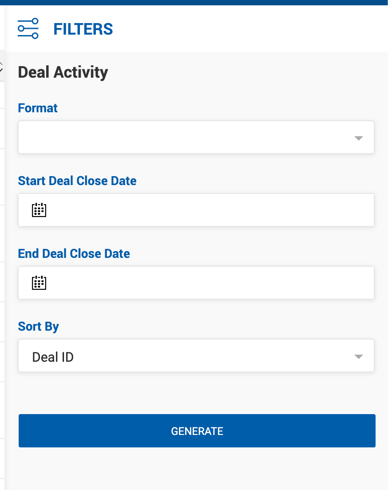
| Filter | Description |
|---|---|
| Start / End Deal Close Date | Filters by actual close date range. |
| Format | Company or Broker. |
| Offices (Company format only) | List of all offices the current user has access to. |
| Brokers (Broker format only) | List of brokers participating in deals the current user has access to. |
| Sort By | Deal ID, Business Line, or Close Date. When Business Line is selected, deals are sorted alphabetically by Business Line within each office or broker group. |
Company Format Fields
Each broker section displays the broker name and deal count, followed by column headers and individual deal rows. A Total row appears at the end of each broker section.
| Column | Description |
|---|---|
| ID | Deal ID. |
| Close Date | Actual Close Date. |
| Rep Type | Seller Rep, Buyer Rep, Landlord Rep, Tenant Rep, or Other Rep. |
| Transaction Type | Lease or Sale. |
| Lease Type | Value from the Lease Type dropdown on the deal's Transaction Information section. |
| Referral Type | Deal Source. |
| Business Line | Property Type. |
| Space Type | Space type from the Space Information section on the deal. |
| Deal Name | Name of the deal. |
| Seller / Landlord | Seller or Landlord company name and first contact (name, phone number, and email). |
| Buyer / Tenant | Buyer or Tenant company name and first contact (name, phone number, and email). |
| Property Address, City, State | All address values grouped in one column. |
| SF | Property square footage. |
| AC | Property acreage. |
| Units | Property units. |
| Term | Lease term in months. Blank for Sale deals. |
| Transaction Total | Deal Transaction Total. |
| Price per SF | Price per square foot. |
| Total Commission | Total commission for internal brokers and brokers who share commission. |
| Outside Commission | Outside Broker Gross for brokers where House Paid = Yes, and outside brokers who share internal commission. |
| Internal Commission | Internal Broker Gross. |
| Broker Gross | Broker Gross for the particular broker. |
| Deal % | Internal Commission as a percentage of Total Commission. |
| Office | Office the deal belongs to. |
Note: Deal comments (notes from the Deal Profile) appear in a separate row directly below the related deal row, spanning from the first column up to the Transaction Total column.
Broker Format Fields
The Broker format uses the same column structure with the following differences: deals are grouped by individual broker rather than by office, and the Transaction Type, Lease Type, and Space Type columns are not included.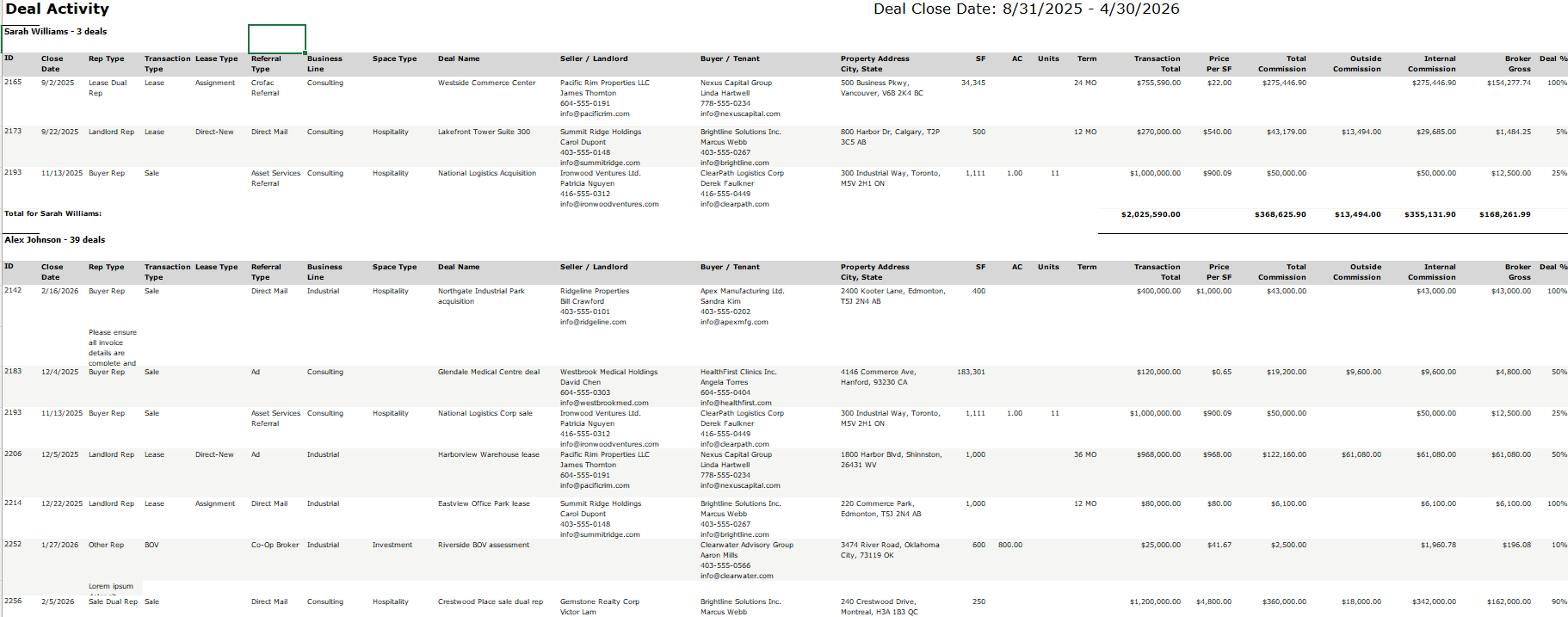
| Column | Description |
|---|---|
| ID / Close Date | Deal ID and Actual Close Date. |
| Rep Type | Seller Rep, Buyer Rep, Landlord Rep, Tenant Rep, or Other Rep. |
| Referral Type | Deal Source. |
| Business Line | Property Type. |
| Deal Name | Name of the deal. |
| Seller / Landlord | Seller or Landlord company name and first contact. |
| Buyer / Tenant | Buyer or Tenant company name and first contact. |
| Property Address, City, State | All address values grouped in one column. |
| SF | Property square footage. |
| AC | Property acreage. |
| Units | Property units. |
| Term | Lease term in months. Blank for Sale deals. |
| Transaction Total | Deal Transaction Total. |
| Total Commission | Total commission for internal brokers and brokers who share commission. |
| Outside Commission | Outside Broker Gross. |
| Internal Commission | Internal Broker Gross. |
| Broker Gross | Broker Gross for the particular broker. |
| Deal % | Broker Gross commission percentage. |
| Office | Office the deal belongs to. |
Note: An extra row is reserved directly below the ID/Close Date for deal comments (notes from the Deal Profile).