Overview
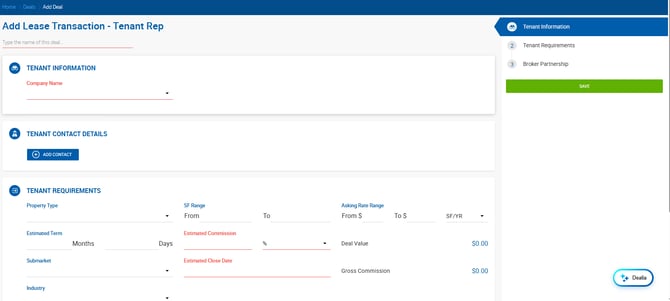
The Add Tenant Rep form organizes deal creation into three sections, accessible from the right sidebar: Tenant Information, Tenant Requirements, and Broker Partnership.
Deal Name
Required. If left blank, the field is automatically populated with the Tenant Company Name once that field is entered.
Tenant Information
Company Name — Required. Search for an existing client or create a new one. Editing an existing company name updates the original record. Click X to clear the field.
Tenant Contact Details
Click + Add Contact to add one or more contacts from the tenant's organization.
Tenant Requirements
| Field | Description |
|---|---|
| Property Type | Dropdown of property types. Manageable under Admin > Manage Data. |
| SF Range | From/To numeric range for required square footage. |
| Asking Rate Range | From/To dollar range with rate type selector (e.g., SF/YR). |
| Estimated Term | Number of months and days for the estimated lease term. |
| Estimated Commission | Required. Tenant rep fee. Numeric, up to 8 decimal places. Commission Type dropdown: % or $/SF. |
| Estimated Close Date | Required. |
| Submarket | Dropdown of submarkets. Manageable under Admin > Manage Data. |
| Industry | Dropdown for the tenant's industry. |
| Deal Value | Read-only. Pre-calculated from Space Required, Budget per SF, and Term. Only calculated until deal-related values are entered. |
| Gross Commission | Read-only. If Commission Type is %, calculated as Estimated Commission% × Deal Value ÷ 100. If $/SF, calculated as Estimated Commission × Square Feet. |
Broker Partnership
Internal Brokers
| Field | Description |
|---|---|
| Broker Name | Search and select from existing brokers only. |
| Commission % | Up to 100%, with up to 7 decimal places. |
| Lead | Yes/No toggle to identify the lead broker. |
External Brokers
| Field | Description |
|---|---|
| Broker Name | Search and select from existing brokers only. |
| Commission % | Up to 100%, with up to 7 decimal places. |
Click Save to create the deal.