
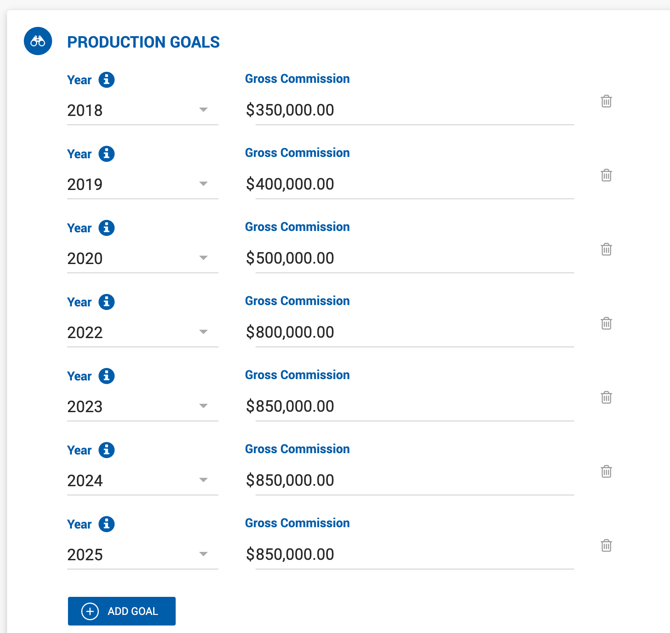
Production Goals
| Field | Description |
|---|---|
| Year | Includes the current year, next year, and all prior years back to the broker's hire year (based on Hire Date). |
| Gross Commission | Target gross commission for the selected year. Accepts whole numbers with standard comma formatting. |
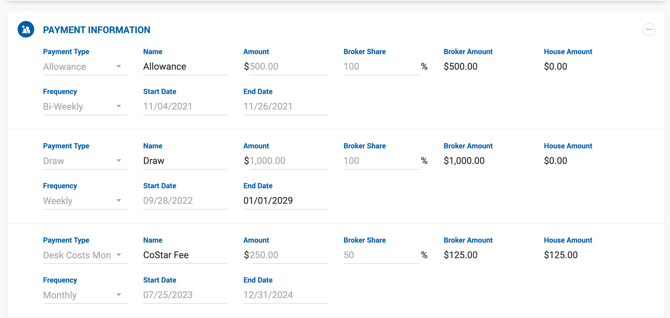
Payment Information
This section is used to track broker expenses that may be issued occasionally or on a recurring basis. If the Broker Ledger setting is enabled under System Settings, these payments can be exported in a monthly format for the current or any past month.
| Field | Description |
|---|---|
| Payment Type | Predefined payment category. Values are pulled from Manage Data > Broker Payments. Draw and Allowance are always available as standard options. |
| Payment Name | Free text field for a custom expense name. |
| Amount $ | Total payment amount in USD. |
| Broker Share % | Percentage of the payment due by the broker. |
| Broker Amount $ | Read-only. Calculated as: Amount $ × Broker Share %. |
| House Amount $ | Read-only. Calculated as: Amount $ − Broker Amount $. |
| Frequency | Recurring payment interval: Weekly, Bi-Weekly, or Monthly. |
| Start Date | The date the expense takes effect. |
| End Date | The date the expense stops being applied. |
| Delete Icon | Removes the payment line. A confirmation prompt appears, noting that all associated balance will be cleared. |
There is no limit to the number of payment entries that can be assigned to a broker.
Documents
Administrative documents related to the broker can be uploaded in this section. Documents can be deleted at any time.
Remember: After making any changes to the broker profile, click Save in the top-right corner to apply them.
