
Overview
Managers can open the Broker Tracker for any broker by clicking the broker's row on the Leaderboard widget or the Leaderboard page. The page is split into three tabs: Deals (default), Payments, and Activity.
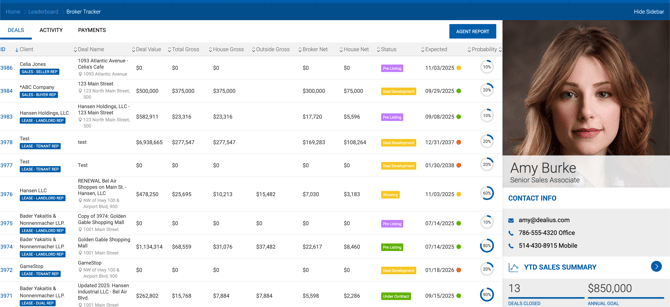
Sidebar
The sidebar displays personal and YTD summary information for the selected broker. Personal details are managed under Admin > Users & Roles and include:
- Profile image
- Full name
- Title
- Email address
- Office phone number
YTD Sales Summary
All values are based on the current fiscal year to today, filtered to offices the logged-in user has access to. Deals are identified by Actual Close Date or Lease Execution Date.
| Metric | Description |
|---|---|
| Deals Closed | Number of closed deals (paid or unpaid) where the selected broker is a participant in the current FY. |
| House Gross | Sum of House Gross for closed deals in the current FY where the broker is a participant. |
| Outside Gross | Sum of Outside Gross for closed deals in the current FY where the broker is a participant. |
| Broker Gross Paid | Sum of Broker Gross for closed deals in the current FY for the selected broker. |
| Broker Net Paid | Sum of paid Broker Net from FY start to today, based on payable data. |
| Expenses | Sum of payable due expenses where the Payable Due Date falls between FY Start and today. |
| Broker Net Paid After Expenses | Sum of paid Broker Net minus Expenses from FY start to today, based on payable data. |
| Expenses Paid | Sum of deducted expenses for already paid payables from FY start to today. |
| Annual Goal | Informational field. Managed on the Broker Profile. |
Clicking the YTD Summary arrow navigates to the Deals page filtered for that broker's closed deals in the current fiscal year.
Deals Tab
Displays all open deals for the selected broker. Each deal is clickable and opens the Deal Profile page.
Payments Tab
Displays all unpaid payables for the selected broker. The layout mirrors the Accounting > Payables page. Invoice PDFs can be downloaded directly from this tab.
Activity Tab
A read-only chronological feed of all notes posted by the broker across their deals, with the most recent entries at the top. Clicking a Deal ID above a note thread opens the Deal Profile > Notes page for that deal, where additional notes can be added.