Overview
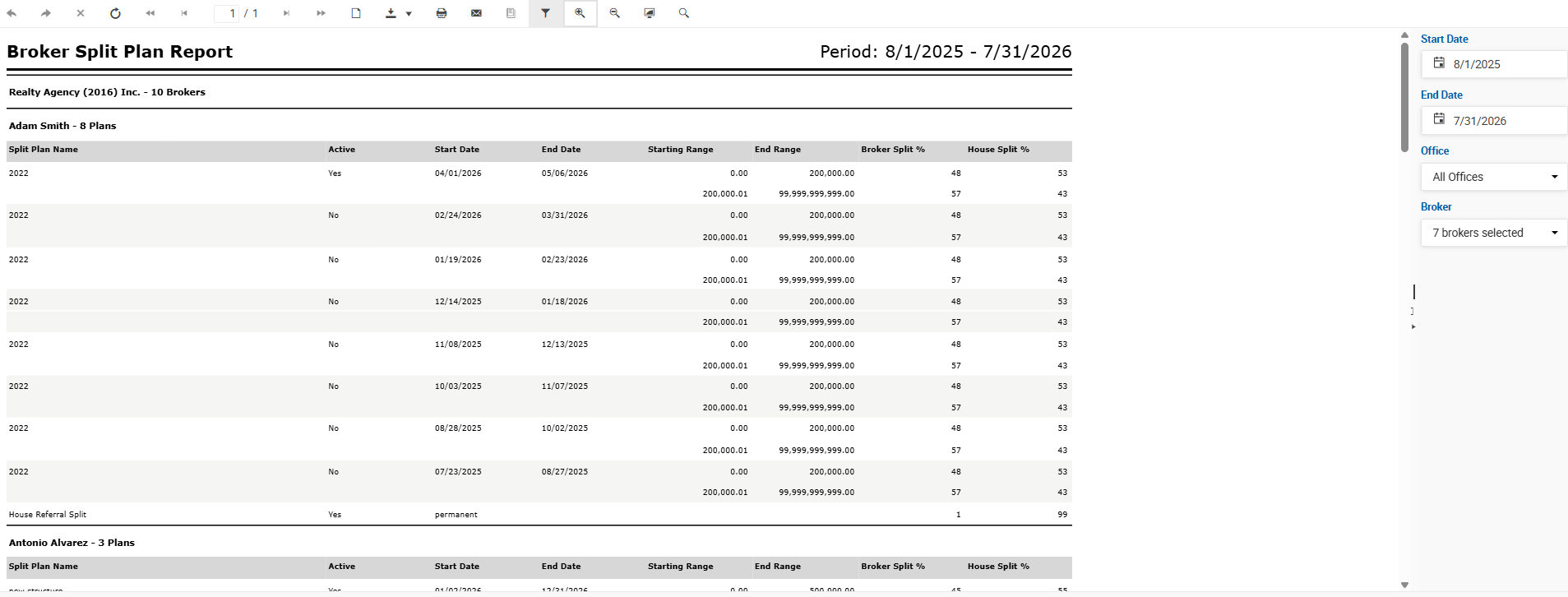
The Broker Split Plan Report lists all split plans that fall fully or partially within the selected date range. It supports multi-year date ranges, making it useful for reviewing the history of split plans active during any given period. A dedicated line is included for each broker's House Referral Split, which applies to deals tagged as House Referrals.
The report is grouped by broker, with each broker's section showing their name and the number of plans. Within each section, split plans are listed with their full tier structure.
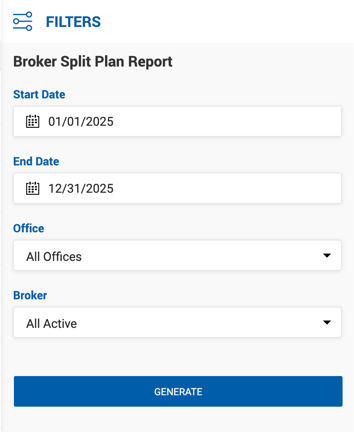
Filters
| Filter | Description |
|---|---|
| Start Date | Start of the date range. Defaults to the start of the current fiscal year. |
| End Date | End of the date range. Defaults to the end of the current fiscal year. |
| Office | Filter by office. Defaults to All Offices. |
| Broker | Filter by broker. Options include All Active Brokers, All Inactive Brokers, or individual selection. |
Report Columns
| Column | Description |
|---|---|
| Split Plan Name | Name of the split plan. |
| Active | Whether the plan is currently active (Yes or No). |
| Start Date | The date the split plan period begins. |
| End Date | The date the split plan period ends. Blank for permanent plans. |
| Starting Range | The lower threshold of the split tier. |
| End Range | The upper threshold of the split tier. |
| Broker Split % | The broker's commission percentage for this tier. |
| House Split % | The house's commission percentage for this tier. |
Each split plan may contain multiple rows — one per tier level. A separate House Referral Split line appears at the end of each broker's section, showing the split applied to House Referral deals. Permanent plans display permanent in the Start Date field with no End Date.