Here's the rewritten version based on the screenshot and description:
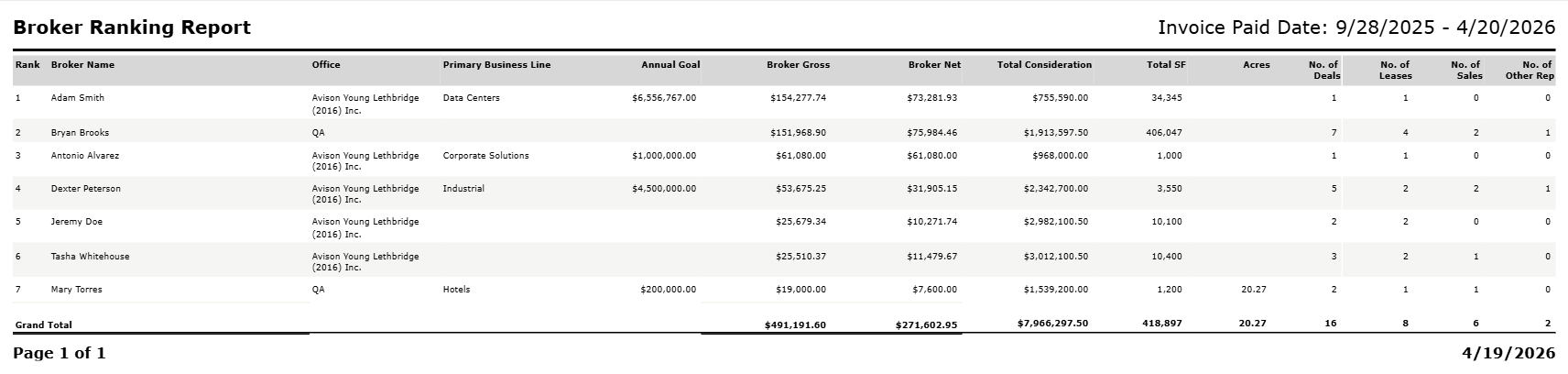
Broker Ranking Report
A performance report ranking brokers by gross commission earned within the selected period, based on payments received.
Overview
The Broker Ranking Report ranks brokers by Broker Gross and provides a detailed breakdown of commissions, deal counts, and transaction values. It can be generated based on paid invoices (receivables) or deal close dates. Results are sorted by rank, which is determined by Broker Gross in descending order.
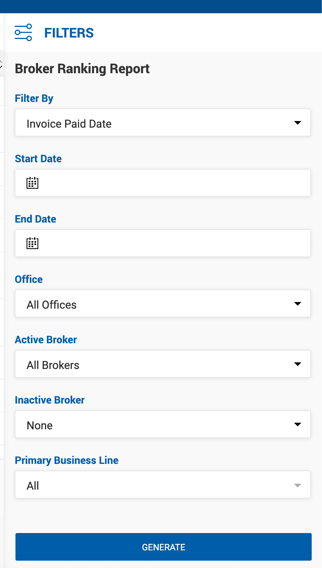
Filters
| Filter | Description |
|---|---|
| Filter By | Invoice Paid Date or Deal Close Date. |
| Start Date / End Date | Date range applied based on the Filter By selection. |
| Office | Dropdown of offices. Defaults to All Offices. |
| Active Brokers | Dropdown of active brokers. Defaults to All Brokers. |
| Inactive Brokers | Dropdown of inactive brokers. Defaults to None selected. |
| Primary Business Line | Dropdown of values from the Primary Specialty field on Broker Profiles. If none selected, all specialties are included. |
Report Columns
| Column | Description |
|---|---|
| Rank | Broker's ordinal ranking based on Broker Gross. |
| Broker Name | Broker name displayed as First Name Last Name. |
| Office | Office name from the current instance. |
| Primary Business Line | Primary Specialty from the Broker Profile. |
| Annual Goal | Annual goal from the Broker Profile. When the report spans multiple years, the current FY goal is shown. |
| Broker Gross | Sum of Broker Gross for paid receivables within the selected period, regardless of whether associated payables are paid or unpaid. |
| Broker Net | Sum of Broker Net for paid receivables within the selected period. |
| Total Consideration | Sum of transaction totals for all deals with invoices included in the report. Reflected per broker participating in the deal. Not double-counted if multiple payments on the same deal fall within the selected period. |
| Total SF | Sum of Square Feet Available from the property (if no space is used) or from the space (if a space is linked to the deal). Excludes Land property type deals. |
| Acres | Sum of Acres for Land property type deals. Uses property acres if no space is linked, or space acres if the space is of Land type. |
| No. of Deals | Total number of deals included in the report based on the selected period. |
| No. of Leases | Number of lease deals included. |
| No. of Sales | Number of sale deals included. |
| No. of Other Rep | Number of Other Rep deals included. |
The last row of the report is a Grand Total row summing Broker Gross, Broker Net, Total Consideration, Total SF, Acres, and all deal count columns.