
Overview
The Broker Ledger Report is available when the Broker Ledger feature is enabled under Admin > System Settings. It provides a detailed breakdown of paid and due expenses per broker, split into two sections: Deal Expenses and Non-Deal Expenses. Each broker's section displays their name and office, followed by both expense sections with individual line items and totals.
Note: Fixed broker expenses are not generated for future periods — they are limited to current and past periods only.
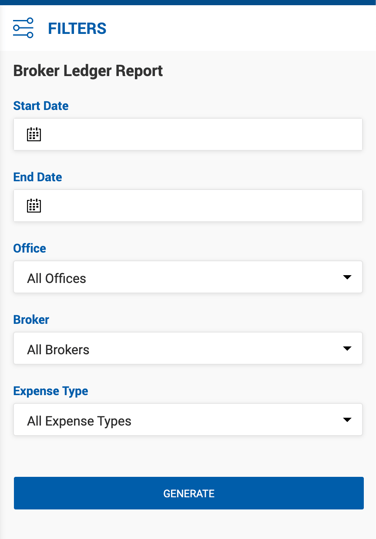
Filters
| Filter | Description |
|---|---|
| Start Date / End Date | For paid expenses: covers the expense paid date. For unpaid expenses: covers the expense due date. For unpaid deal expenses specifically: uses the deal close date. |
| Office | Filter by office. Defaults to All Offices. |
| Broker | Filter by one or more brokers. |
| Expense Type | Filter by Deal Expenses only, Non-Deal Expenses only, or All Expense Types. |
Deal Expenses Section
Lists all deal-related expenses for the broker within the selected period. If an expense is covered across multiple payables, a separate line is generated for each payment.
| Column | Description |
|---|---|
| Deal ID | Unique deal identifier. |
| Deal Name | Name of the associated deal. |
| Expense Type | Type of expense. |
| Vendor Name | Vendor associated with the expense. |
| Description | Comment describing the expense on the deal. |
| Deal Close Date | Close date of the associated deal. |
| Due Date | Due date of the expense. |
| Expense Amount | Total expense amount specified in the deal. |
| Broker Share % | Percentage of the expense assigned to the broker. |
| House Share % | Percentage of the expense assigned to the house. |
| Amount Due | Total amount due or paid for the expense by the broker. |
| Amount Paid | Amount already paid by the broker. |
| Open Balance | Remaining unpaid balance for the broker. |
| Payable # | Payable number and sequence in which this expense was covered (e.g., 1 of 2). Empty for unpaid expenses. |
| Date Paid | Date the payable covering this expense was paid. |
A Total for Deal Expenses row summarizes Expense Amount, Amount Due, Amount Paid, and Open Balance.
Non-Deal Expenses Section
Lists all non-deal (broker ledger) expenses for the broker within the selected period. If the date range covers multiple occurrences of a recurring expense based on its frequency, a separate line is generated for each occurrence.
| Column | Description |
|---|---|
| Deal ID | ID of the deal where this non-deal expense was covered. Populated for paid expenses only. |
| Deal Name | Name of the deal where this non-deal expense was covered. Populated for paid expenses only. |
| Expense Type | Payment Type selected for the expense on the Broker Profile. |
| Expense Name | Payment Name selected for the expense on the Broker Profile. |
| Frequency | Recurrence frequency defined on the Broker Profile: Weekly, Bi-Weekly, or Monthly. |
| Validity Period | Start and end dates of the expense as specified on the Broker Profile. |
| Due Date | Due date for this specific occurrence of the expense. |
| Amount per Period | Fixed dollar amount of the expense per recurrence period. |
| Broker Share % | Percentage of the expense assigned to the broker. |
| House Share % | Percentage of the expense assigned to the house. |
| Amount Due | Total amount due or paid for this expense within the selected period. |
| Amount Paid | Amount already paid by the broker within the selected period. |
| Open Balance | Remaining unpaid balance within the selected period. |
| Payable # | Payable number and sequence in which this expense was covered. Empty for unpaid expenses. |
| Date Paid | Date the payable covering this expense was paid. |
A Total for Non-Deal Expenses row summarizes Expense Amount, Amount Due, Amount Paid, and Open Balance.
A Grand Total row at the end of each broker's section combines the totals from both the Deal Expenses and Non-Deal Expenses sections.