
Overview
Company records in Dealius now support multiple billing addresses. Billing address management has been moved to a dedicated Billing Addresses tab within the company popup.
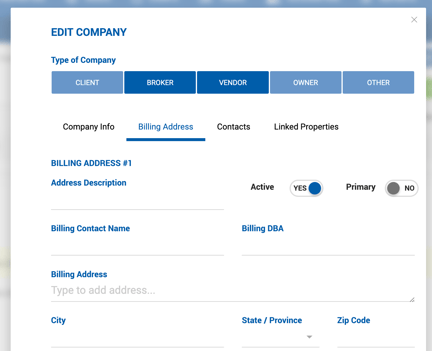
Billing Address Fields
Each billing address includes the following fields:
Existing fields: Billing Contact Name, Billing DBA, Billing Address, City, State/Province, Zip Code, Phone + Extension, Email Address, Billing Preference.
New fields:
| Field | Description |
|---|---|
| Address Name | Free text label to help differentiate between multiple addresses. |
| Notes | Free text notes. |
| Active | Marks the address as active or inactive. Inactive addresses are not available for selection on deals and listings. A company may have multiple active addresses simultaneously. |
| Primary | Designates one address as the main address for the company. Only one address can be marked as Primary at a time. |
Click + Add Address to add additional billing addresses to the company record.
Deleting a Billing Address
A billing address can only be deleted if it has not yet been linked to any deal or listing. If the address is already in use, the delete option is grayed out.
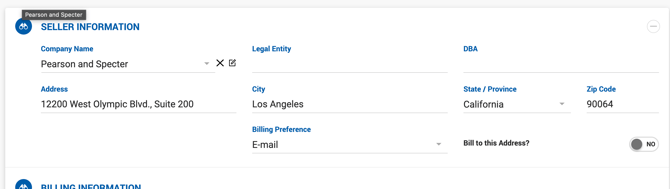
Selecting a Billing Address on a Deal or Listing
When a company is selected on a deal or listing profile and the Bill to This Address toggle is set to No, the user is prompted to select one of the company's available billing addresses. If the company has only one address, it is populated automatically. The selected address can be removed using the X icon.
The same selection logic applies when billing is set to a Third Party.
Payment Vouchers
When an outside broker is added to a deal and their payment voucher is printed under Accounting > Payables, the voucher displays the company name and the company's primary billing address, if one has been set.