Overview
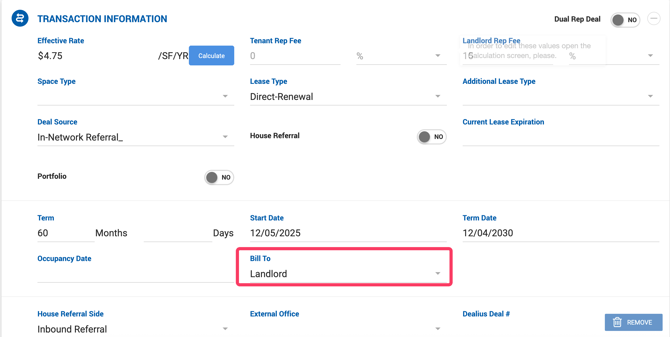
On the Deal Profile, users can select which party will be billed for the deal. The Bill To field defaults based on deal type:
- Lease deals — defaults to Landlord
- Sale deals — defaults to Seller
Other available options include the opposing party (Tenant or Buyer) or a Third Party.
Billing Address
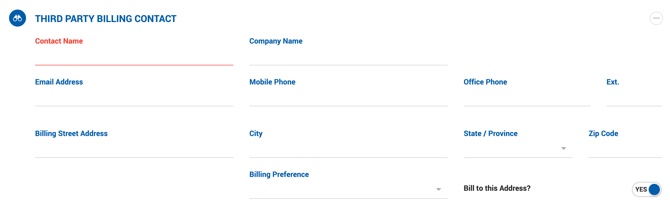
A separate billing address can be entered for the selected Bill To party by enabling the Bill to this Address toggle. This option is only available for the party currently selected in the Bill To dropdown.
When billing information is filled in, it is used on the Invoice PDF with the following priority:
- Legal Entity — pulled from the Billing Information section if entered.
- Contact Name — pulled from the Billing Information section only if Legal Entity is blank.
Third Party Billing
If Third Party is selected in the Bill To dropdown, a Third Party Billing Contact section appears below the Transaction Information section. Users can select an existing contact or create a new one. Accepted company types for third-party contacts are: Broker, Vendor, and Other.
Changing Billing Info on Closed Deals
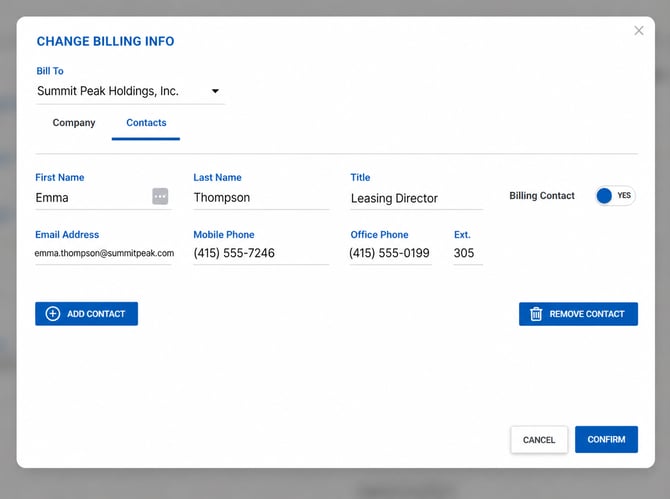
On closed deals with unpaid or partially paid accounting, users can update the billing company and its contacts using the Change Billing Info button on the deal profile. Clicking it opens a popup where you can:
- Switch the Bill To party using the dropdown
- Update company details on the Company tab
- Add, edit, or remove contacts in the Contacts section
Changes to the billing company and contacts will apply to all open invoices in the deal. Paid invoices retain the billing info that was in place at the time of payment and will not be affected.