Overview
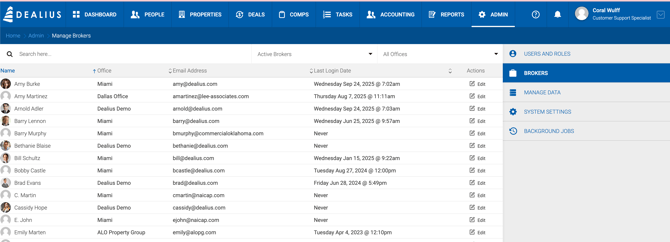
All users with the Broker role are listed under Admin > Brokers. The grid can be searched by name, email, or office, and filtered by broker status (Active or Inactive) and office. The table is sortable by all columns.
Exporting Brokers
The broker list can be exported to Excel from Admin > Brokers, respecting any applied filters. The export includes the following fields:
- Broker Name
- Broker Email
- Status (Active / Inactive)
- Office Name
- Last Login Date & Time
- Broker Type
- Primary Specialty
- Business Name
- License #
- License Expiration Date
- License State
For brokers with multiple licenses, each license is added sequentially with its number, expiration date, and state.
Editing a Broker
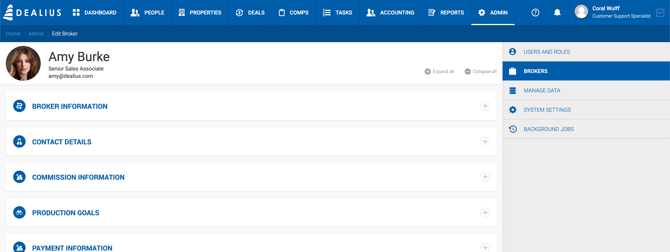
Click the Edit icon in the grid to open the Broker Profile page. The header displays the broker's image, first and last name, and email. These details are not editable here — they can be updated under Admin > Users & Roles.
Broker Information
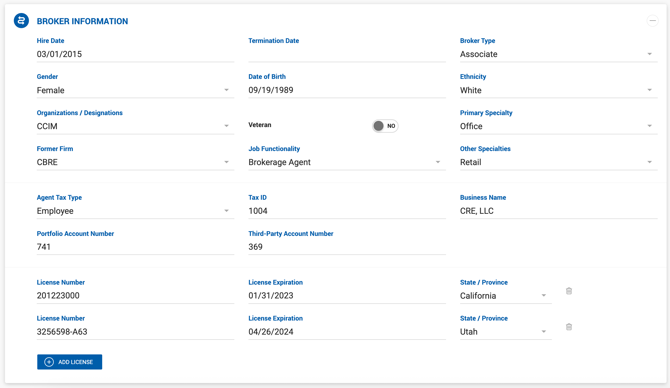
| Field | Description |
|---|---|
| Hire Date | Date the broker was hired. |
| Termination | Date the broker's contract ends. |
| Broker Type | Type of broker. |
| Gender | Broker's gender. |
| Date of Birth | Broker's date of birth. |
| Ethnicity | Broker's ethnicity. |
| Organizations / Designations | Broker's professional organizations or designations. |
| Veteran | Toggle field. |
| Primary Specialty | Single-select dropdown for the broker's primary specialty. |
| Former Firm | Broker's previous place of employment. |
| Job Functionality | Broker's job function. |
| Other Specialties | Multi-select dropdown for additional specialties. |
| Agent Tax Type | Employee, Contractor, or House. |
| Tax ID | Broker's tax identification number. |
| Business Name | Linked to the Vendor Name field in QuickBooks. |
| Portfolio Account Number | Free text field. |
| Third-Party Account Number | Free text field. |
| License Number | Broker's license number. |
| License Expiration | Date the broker's license expires. |
| State / Province | US state or Canadian province the license is associated with. |
| Add License | Allows adding up to 5 licenses tied to different states or provinces. Based on expiration dates and the Broker License Expiration notification setting, reminders may be sent for expiring licenses. |

Contact Details
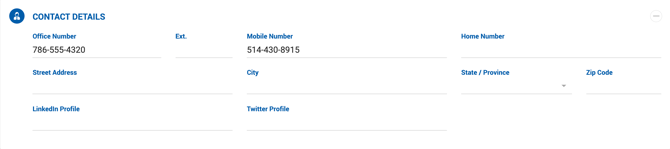
| Field | Description |
|---|---|
| Office Number (with Extension) | Displayed in the broker sidebar on Deal Profile pages. |
| Mobile Number | Displayed in the broker sidebar on Deal Profile pages. |
| Home Number | Broker's home phone number. |
| Address Fields | Broker's address. |