
Getting Started
- Click the Deals tab in the main navigation.
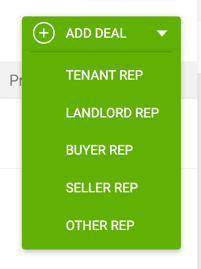
- Click the green Add Deal button and select Tenant Rep from the dropdown.
- Fill in the required fields and click Save to create the deal and begin tracking it.

Required fields to save:
- Deal Name — A custom name for easy identification and search.
- Tenant Company Information — The tenant company and first contact. Search for an existing client or add a new one. Editing an existing company name updates the original record. Click X to clear the field.
- Estimated Close Date — The anticipated closing date for the deal.
Once saved, you can continue filling in additional details immediately or return to complete the Deal Profile as the deal progresses.
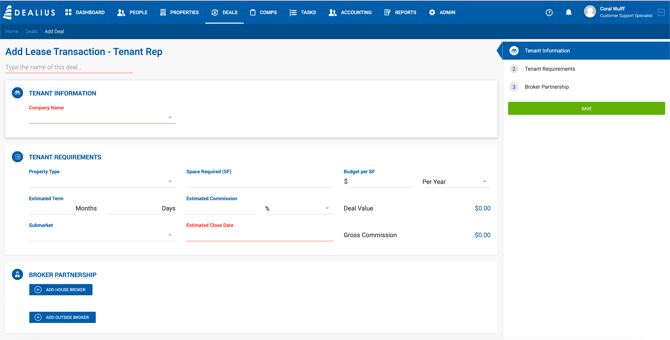
Tenant Requirements
| Field | Description |
|---|---|
| Property Type | Dropdown. Manageable under Admin > Manage Data. |
| Space Required (SF) | Numeric integer field. |
| Budget per SF | Dollar amount with 2 decimal places. |
| Lease Rent Type | Per Year or Per Month. Defaults to the office setting. Can be changed if the deal is calculated monthly. |
| Estimated Term | Number of months for the lease term. |
| Deal Value | Read-only. Pre-calculated from Space Required, Budget per SF, and Term. Only calculated until deal-related values are entered. |
| Estimated Commission | Tenant rep fee. Numeric, up to 8 decimal places. |
| Commission Type | % or $/SF. |
| Gross Commission | Read-only. If Commission Type is %, calculated as Estimated Commission% × Deal Value ÷ 100. If $/SF, calculated as Estimated Commission × Square Feet. |
| Submarkets | Dropdown. Manageable under Admin > Manage Data. |
Broker Partnership
Internal Brokers
| Field | Description |
|---|---|
| Broker Name | Search and select from existing brokers only. |
| Commission % | Up to 100%, with up to 7 decimal places. |
| Lead | Yes/No toggle to identify the lead broker. |
External Brokers
| Field | Description |
|---|---|
| Broker Name | Search and select from existing brokers only. |
| Commission % | Up to 100%, with up to 7 decimal places. |