Creating a New Property
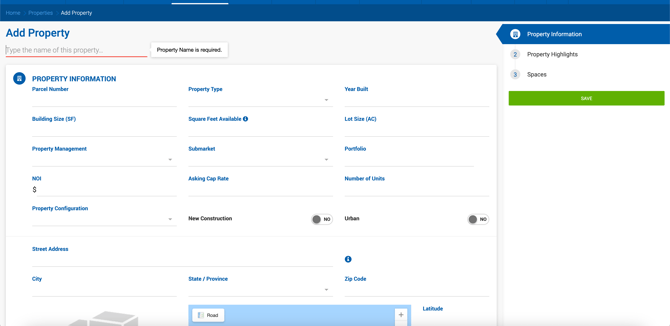
New properties can be created from the Properties grid using the Add Property button. The creation form includes the following:
- Property Name
- Property Information — Same fields as the Property Information section on Deal and Listing profiles
- Property Highlights — A table with the following columns: # (read-only), Description, Order, and Actions
- Spaces — Same fields and buttons as the Spaces section on a Listing profile
- Sidebar with sections and Save button
Duplicate Address Warning
When saving a new property, if the address (street, city, and state or ZIP) matches an existing property, the system displays a warning listing all potential duplicates. If the property is being created directly inside a listing, deal, or comp form, the warning also offers the option to select an existing property instead of creating a new one.
Required Fields
Office Admins can configure which fields are required when creating a property or space, under Admin > System Settings > Properties Settings.
Required to Create a Property:
- Building SF
- Property Address
- Property Type
- SF Available
- Submarket
Required to Create a Space:
- Space Available (SF)
- Space Name
- Space Type
- Space Address
Property Profile
The property profile is organized into the following tabs:
Overview A summary of key data from Property Info, Property Details, and images from the Gallery tab.
Property Info Contains the main property data including address, SF, and Property Highlights. This information is also displayed on linked Listing, Deal, and Comp profiles. The Property Notes field is exclusive to the property profile and does not appear on linked profiles.
Property Details Additional property information split into Primary and Additional sections.
Spaces Space records associated with the property.
Gallery Structured image and file storage. Always contains a main folder for property images, plus individual folders for each space added to the property.
Documents Files uploaded for this property.
Notes Notes specific to this property.
Tasks Task records associated with this property.
Links External or internal links associated with the property.
Listings Listings linked to this property.
Deals Deals linked to this property.
Sale Comps Sale comp records linked to this property.
Lease Comps Lease comp records linked to this property.
Property Management Field
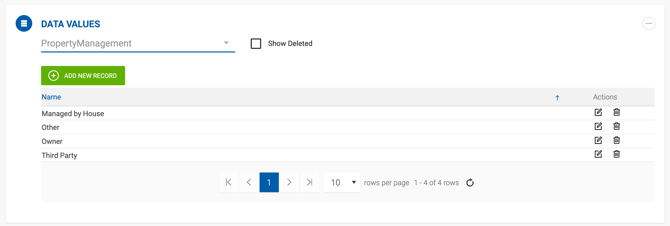
The Property Management field is located under Property Profile > Info tab. It is optional and indicates how the property is managed. Options are: Managed by House, Third Party, Owner, and Other.
This field is displayed across the system on listings, deals, comps, deal abstracts, and deal and comp exports. The available values are dynamic and can be managed under Admin > Manage Data > Property Management.