
Overview
The Summary tab displays one row per closed deal with up to 14 columns of aggregated deal data, similar to the Deals grid. The right sidebar provides real-time YTD production figures and account totals based on the current filters applied.
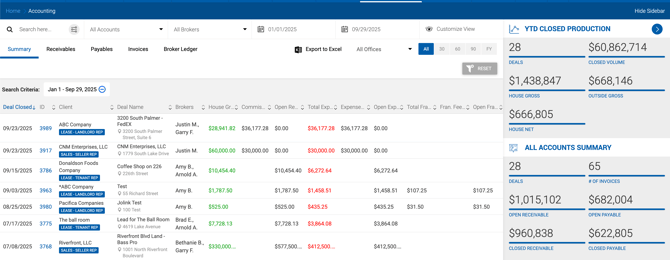
Summary Sidebar
YTD Closed Production
Reflects values for the entire instance from the start of the current fiscal year.
| Metric | Description |
|---|---|
| Deals | Number of closed deals since the start of the fiscal year. |
| Closed Volume | Sum of deal values (e.g., purchase price) for all closed deals. |
| House Gross | Sum of House Gross for all closed deals. If the Display Outside Gross Separate From House Gross toggle is OFF, this value may include Outside Gross. |
| Outside Gross | Sum of Outside Gross for all closed deals. Only displayed when Display Outside Gross Separate From House Gross is ON. |
| House Net | Sum of House Net for all closed deals. |
All / Open / Closed Accounts
Values in this section are affected by the Account Type dropdown in the Filters section and reflect only the deals currently displayed in the grid.
| Metric | Visible When | Description |
|---|---|---|
| Deals | Always | Number of deals matching the current filters. |
| # of Invoices | Always | Number of open invoices associated with filtered deals. |
| Open Receivable | All / Open Accounts | Sum of open receivable amounts. |
| Closed Receivable | All / Closed Accounts | Sum of received amounts. |
| Open Payable | All / Open Accounts | Sum of unpaid receivables to be paid to brokers. |
| Closed Payable | All / Closed Accounts | Sum of paid receivables paid to brokers. |