
Overview
The Accounting module allows accounting and managerial staff to view and track expenses, receivables, and invoices for closed deals. Each tab presents data in a grid format with relevant columns.
A default landing tab can be set per user under Profile Image > Settings > Preferences > Accounting Tab Default View, so the preferred tab opens automatically when Accounting is clicked.
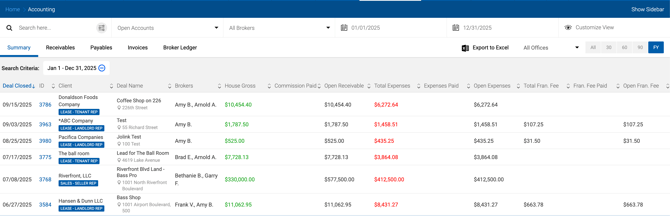
Tabs
| Tab | Description | Grid Structure |
|---|---|---|
| Summary | Aggregated accounting information per deal. Payment and invoice specifics are not shown here. | One row per deal, 14 columns. |
| Receivables | All incoming payments, similar to the Cash Flow screen. Allows marking payments as received. | One row per incoming payment (without broker breakdown). |
| Payables | All outgoing payments the house needs to make, including broker commissions, Franchise Fee, and deal-related expenses. | One row per outgoing payment. |
| Invoices | All invoices generated by the system. | One row per invoice. |
Common Filters
The following filters are available across all Accounting tabs:
| Filter | Type | Description |
|---|---|---|
| Search Box | Text | Search by deal keyword, Deal ID, or Client Name. |
| Open / Closed | Dropdown | Filter by Open Accounts, Closed Accounts, Open Receivables, Closed Receivables, Open Expenses, Closed Expenses, or Pending Expenses. |
| All Brokers | Multi-select Dropdown | Filter by brokers participating in the transaction. |
| From / To Date | Date Picker | Filter by Paid Date (if present) or Due Date. |
| Date Toggles (All / 30 / 60 / 90 / 6M / FY) | Toggle | For the Summary grid: looks back 30/60/90 days. For Receivables, Payables, and Invoices: looks forward 30/60/90 days, 6 months (180 days), or the current Fiscal Year (January 1 – December 31), based on Actual Close Date or Lease Execution Date. |
| Customize View | Dropdown | Select which columns to display in the grid. |